
How to Stop Outbound DDoS in ISP Networks
How to Stop Outbound DDoS in ISP Networks
(Without Breaking Users)
From automated tracing to per-subscriber firewall rules to Quarantine BNG - what we deployed across ISP customer networks to contain botnet traffic from compromised CPEs
Published: April 2026 | Reading time: ~8 min | Part 2 of 2
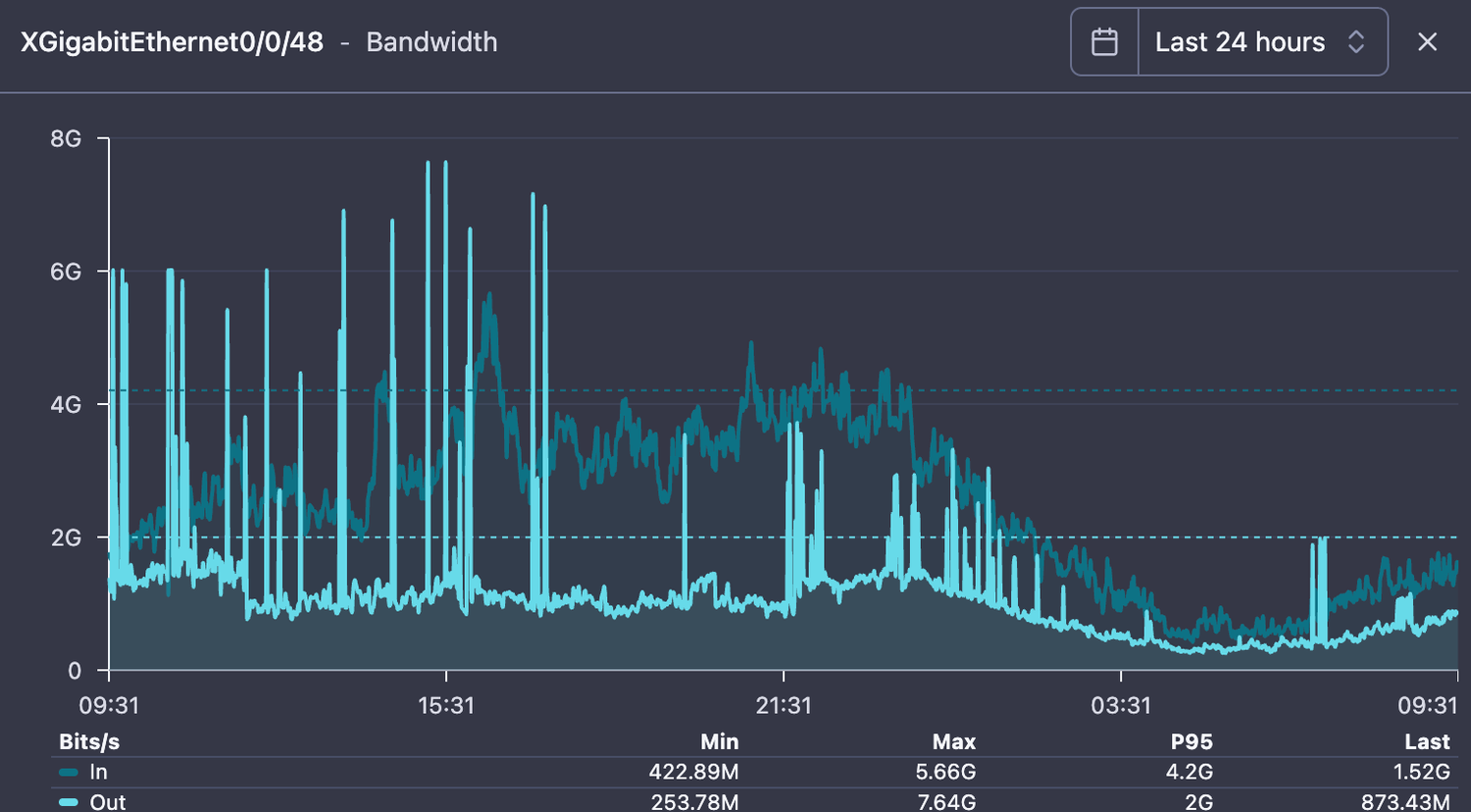
Fig. 1 — An ISP customer's upstream transit link returning to normal after containment.
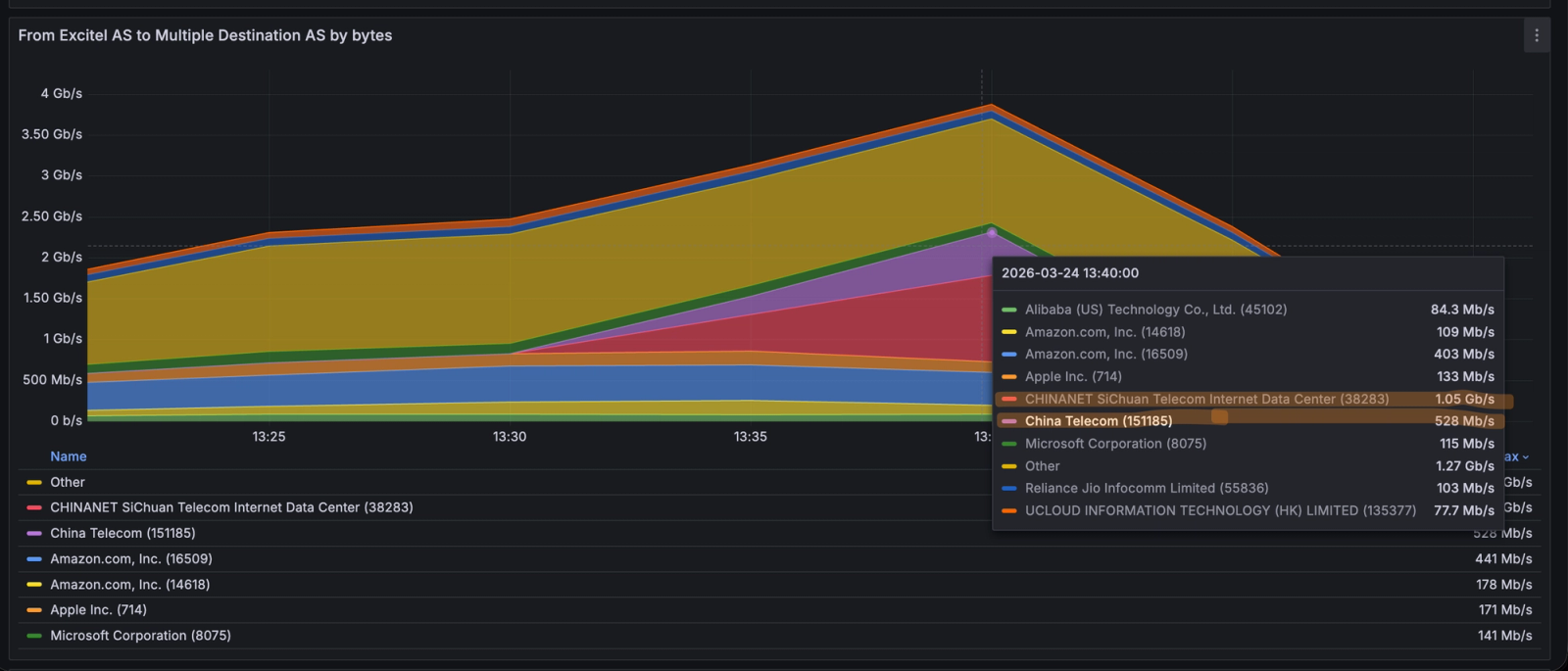
Previously, in Part 1: In late March 2026, ISPs across India started calling us. Thousands of subscriber CPEs had been compromised by botnets (Katana, Kimwolf) and were launching massive outbound UDP floods. It looked like congestion. It was a security event. Flow analysis via NetSense Flow revealed the pattern — outbound UDP on ports 80, 443, and 0, concentrated toward Chinese ASNs. Part 1 covered how to detect it. This post covers how to stop it. Read Part 1: The DDoS Was Coming From Inside the Network
The Gap Between Seeing It and Stopping It
Once our ISP customers could see the attack in their flow data, the next question was always the same: "Great, we can see it. Now how do we trace it to specific subscribers and stop it without taking down the whole network?"
This is where most ISPs get stuck. Detection is the easy part. The hard part is the tracing chain: from a destination IP at the border, through NAT pools, to a specific BNG, to an individual subscriber session. It requires correlating data across multiple systems, and during a live incident, speed matters.
Automated Tracing: From Border IP to Subscriber
We built SensyAI as a playbook automation layer — not a magic AI box, but a system that can chain together the steps a skilled operator would take, faster and more consistently. Think of it as a senior NOC engineer who never forgets a step, never misreads a NAT table, and can SSH into 20 BNGs simultaneously. We deploy it at ISP customer sites as part of the NetSense stack.
What SensyAI actually does
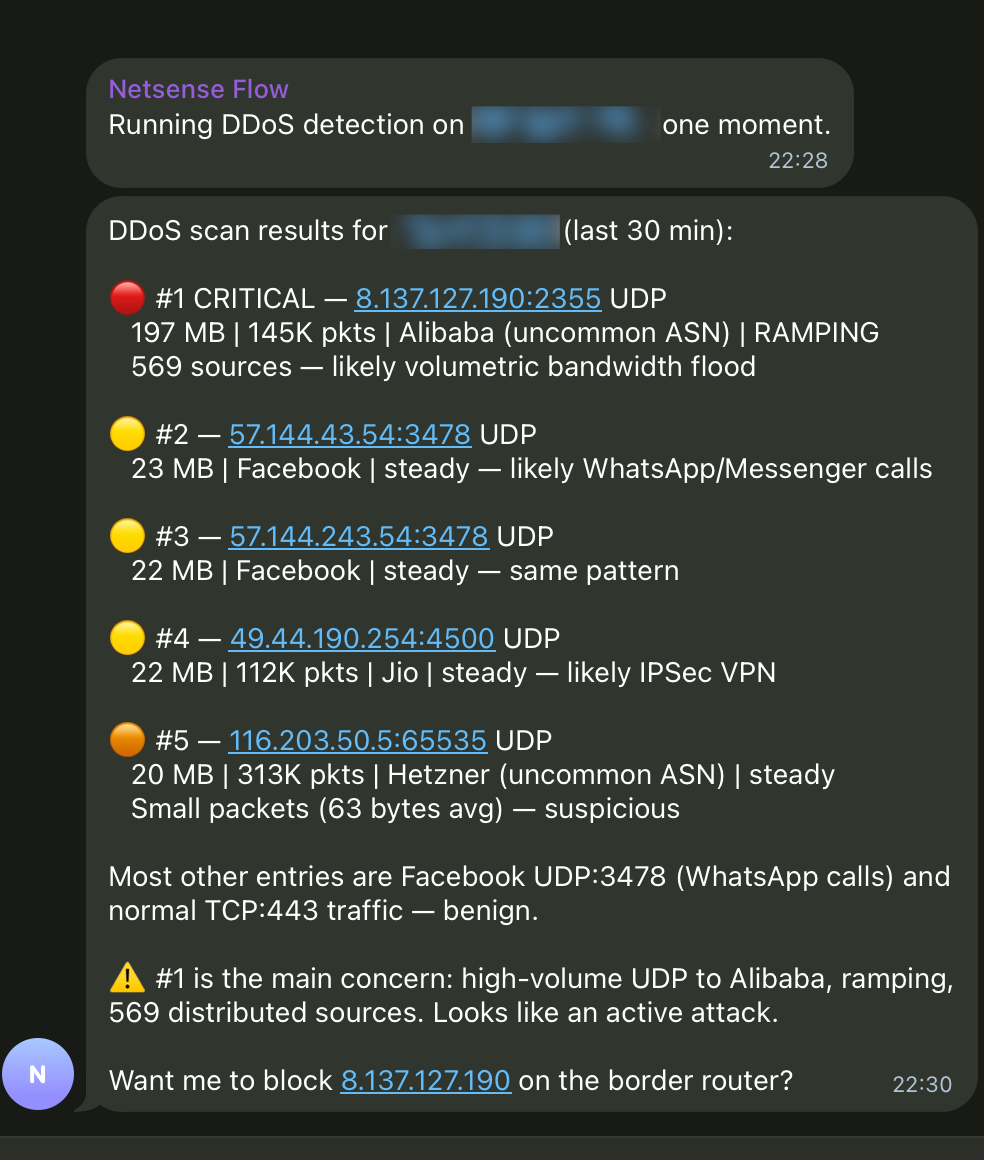
Fig. 2 — SensyAI scanning a border router IP at an ISP customer site. It classified five flows: #1 is CRITICAL (197 MB UDP to Alibaba, 569 sources, ramping). #2-4 are benign (WhatsApp calls, VPN). It offers to block the attack destination at the border.
The tracing chain:
- Flow data reveals which destination IPs are receiving floods, and which source NAT IPs are sending them
- SensyAI queries Netbox (the ISP's IPAM): "which BNG is assigned the prefix containing this NAT pool?" - answered in milliseconds
- SensyAI SSHes into the identified BNG and runs tcpdump on suspect PPP interfaces, queries NAT translation tables, checks per-subscriber counters
- The compromised subscriber is identified by username, MAC, VLAN, OLT port - not just an IP address
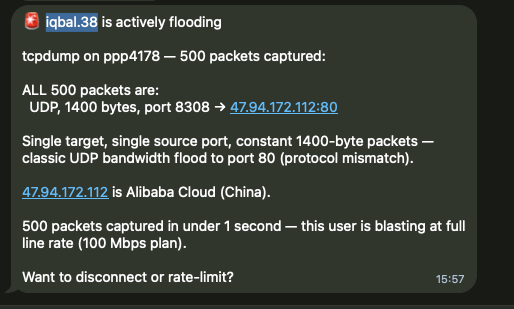
Fig. 3 — End of the chain: user 'iqbal.38' on ppp4178. tcpdump shows 500 packets in under 1 second, ALL UDP 1400-byte to 47.94.172.112:80 (Alibaba Cloud). Full line rate on a 100 Mbps plan. SensyAI offers to disconnect or rate-limit.
Why Netbox integration matters: Without a queryable source of truth mapping NAT pools to BNGs, this tracing step becomes manual spreadsheet archaeology. Every ISP has this mapping somewhere — the question is whether automation tools can access it programmatically. We integrate SensyAI with Netbox at every customer deployment for exactly this reason.
Why the BNG Platform Matters More Than ISPs Think
Everything described above: tcpdump on subscriber interfaces, NAT table queries, per-subscriber nftables rules, SSH access for automation - depends on one thing: having a BNG that lets you do all of this. During a live DDoS event with millions of PPS from thousands of subscribers, the BNG needs to survive the load and remain inspectable.
Several of our ISP customers run software-based BNGs on Linux. This gives them capabilities that proprietary hardware platforms simply do not expose — and it was a decisive advantage during the March 2026 incident:
What you need during DDoS | Software BNG on Linux | Typical hardware BNG |
|---|---|---|
Packet capture on subscriber interface | tcpdump on any ppp interface | Not available or limited |
NAT table query | conntrack -L, programmable | Vendor CLI, slow, incomplete |
Per-subscriber firewall | nftables with meters, raw table | Static ACLs, limited granularity |
Automation access | SSH + any Linux tool | Vendor API, if it exists |
Survive extreme PPS | XDP/eBPF, kernel bypass | Fixed ASIC, may drop sessions |
Scale during attack | Add instances horizontally | Buy bigger box |
What compromised CPEs look like (via NetSense Pulse)
NetSense Pulse collects real-time CPE telemetry: traffic, PPS, CPU, memory. At ISP sites where Pulse is deployed, compromised devices showed unmistakable signatures during the incident:
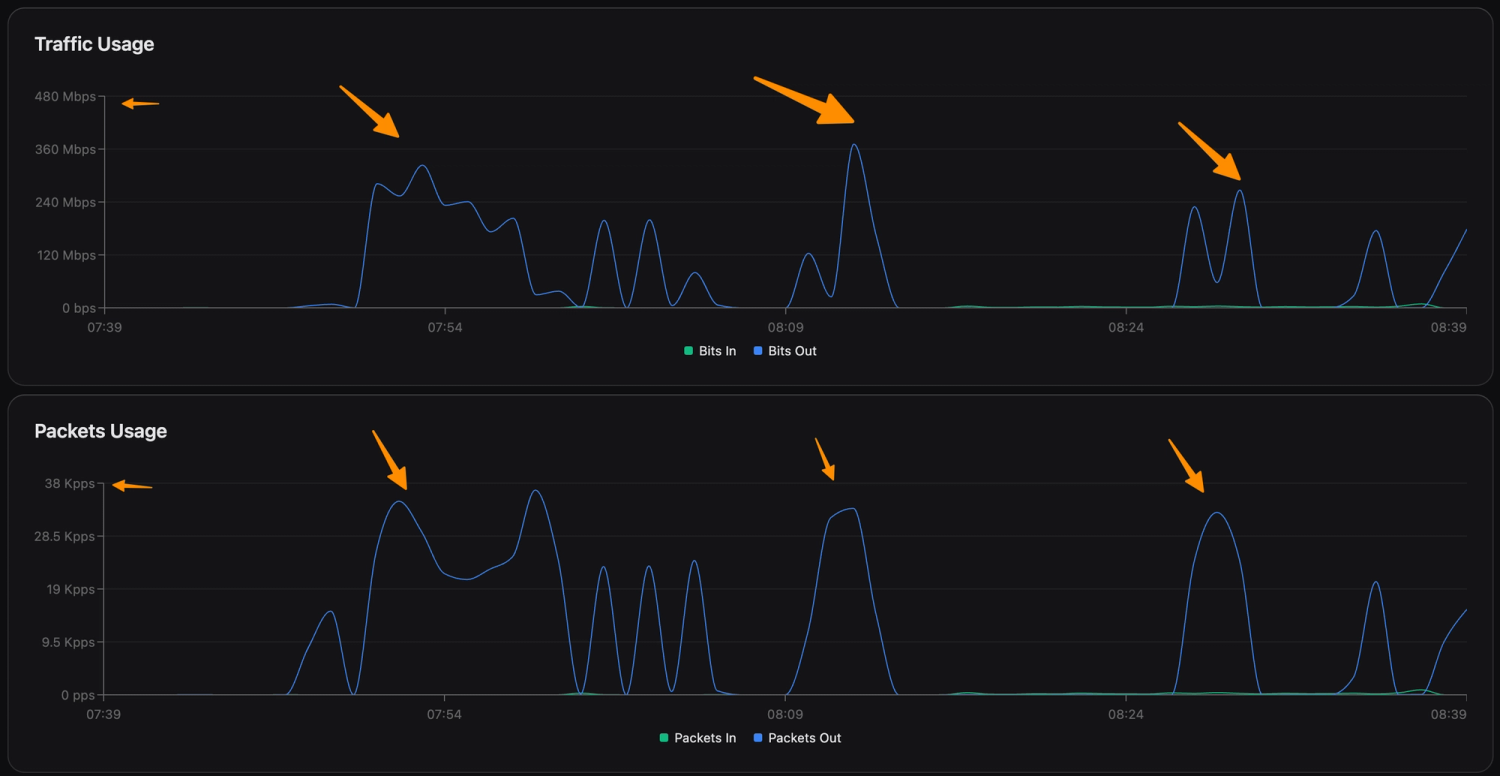
Fig. 4 — Bursty pattern: outbound traffic spikes to 400+ Mbps, drops, spikes again. Packet rate mirrors. Classic botnet attack-idle-attack cycle.
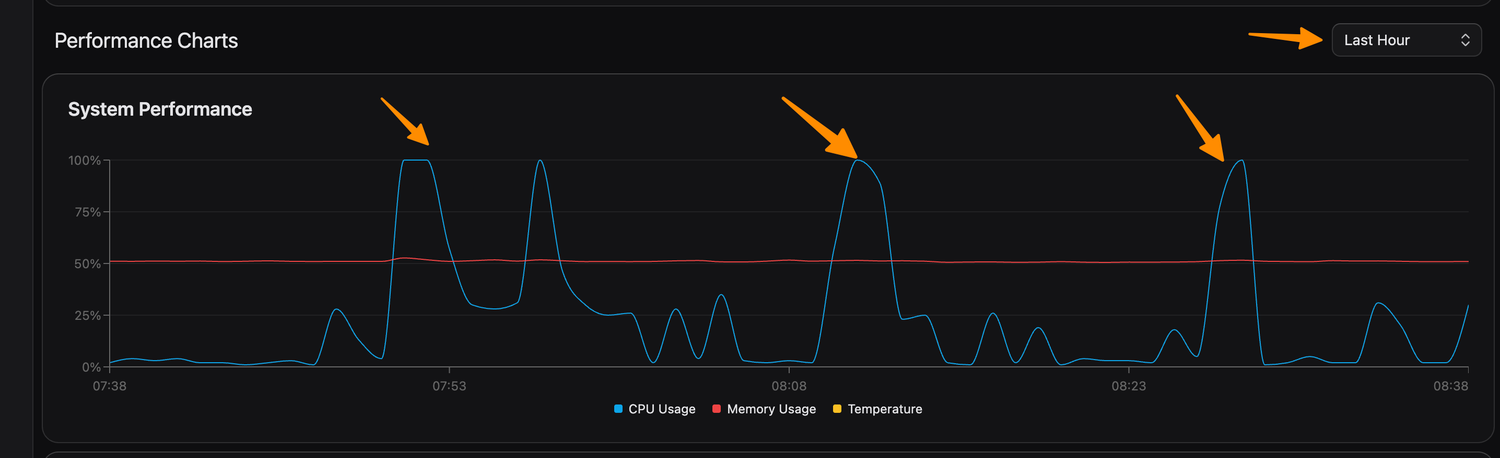
Fig. 5 — CPU spikes to 100% during each attack burst. The device is not forwarding traffic — it is generating it. Malware running on the device itself.
The Firewall Rules: What We Helped Deploy and What We Learned
Working with our ISP customers, we deployed a layered nftables ruleset on their BNG's FORWARD_GUARD chain in the raw table — processing packets before conntrack. This is important: during a flood, you want to drop bad packets before they consume CPU on connection tracking or NAT.
What follows are the actual rules running in production at customer sites, along with the reasoning and the mistakes we made getting here.
Layer 1: Hard drops (the obvious stuff)
Invalid conntrack states, NULL scans, impossible flag combos (SYN+FIN, SYN+RST), and all port 0 traffic. These should never exist. No tuning needed — just drop them.
# --- hard drop: invalid / weird packets ---nft 'add rule ip raw FORWARD_GUARD iifname "ppp*" ct state invalid counter drop comment "invalid ct"'nft 'add rule ip raw FORWARD_GUARD iifname "ppp*" tcp flags & (fin|syn|rst|psh|ack|urg) == 0x0 counter drop comment "NULL scan"'nft 'add rule ip raw FORWARD_GUARD iifname "ppp*" tcp flags & (fin|syn) == (fin|syn) counter drop comment "SYN+FIN"'nft 'add rule ip raw FORWARD_GUARD iifname "ppp*" tcp flags & (syn|rst) == (syn|rst) counter drop comment "SYN+RST"' # --- hard drop: port 0 ---nft 'add rule ip raw FORWARD_GUARD iifname "ppp*" tcp sport 0 counter drop comment "tcp sport 0"'nft 'add rule ip raw FORWARD_GUARD iifname "ppp*" tcp dport 0 counter drop comment "tcp dport 0"'nft 'add rule ip raw FORWARD_GUARD iifname "ppp*" udp sport 0 counter drop comment "udp sport 0"'nft 'add rule ip raw FORWARD_GUARD iifname "ppp*" udp dport 0 counter drop comment "udp dport 0"'Layer 2: ICMP + amplification ports
ICMP: 100 pps/subscriber (burst 200). Amplification ports (chargen, QOTD, DNS, NTP, SSDP, memcached): 500 pps. Legitimate use fits easily within these limits.
# --- ICMP limiter ---nft 'add rule ip raw FORWARD_GUARD iifname "ppp*" ip protocol icmp meter cust_icmp { ip saddr limit rate over 100/second burst 200 packets } counter drop comment "ICMP flood"' # --- amplification ports ---nft 'add rule ip raw FORWARD_GUARD iifname "ppp*" udp dport { 17, 19, 53, 123, 1900, 11211 } meter cust_amp { ip saddr limit rate over 500/second burst 300 packets } counter drop comment "amp"' Layer 3: New flow control (this is the important one)
Limiting new TCP connections (SYN) to 200/s and new UDP flows to 500/s per subscriber. This directly counters the bursty attack pattern — each burst needs new flows, and capping flow creation rate chokes the burst before it builds.
# --- new flow control: important for burst attacks ---nft 'add rule ip raw FORWARD_GUARD iifname "ppp*" ct state new tcp flags & (syn|ack) == syn meter cust_tcp_new { ip saddr limit rate over 200/second burst 300 packets } counter drop comment "new TCP conn limit"'nft 'add rule ip raw FORWARD_GUARD iifname "ppp*" ip protocol udp ct state new meter cust_udp_new { ip saddr limit rate over 500/second burst 300 packets } counter drop comment "new UDP flow limit"'Layer 4: Port-aware rate limiting
This is where we spent the most time tuning — and where we got it wrong initially.
What we got wrong first: Our initial deploy at one ISP customer set UDP/443 to 1,000 pps, same as TCP/80. This broke QUIC for heavy users — video calls, Google services, YouTube uploads. We had to back off to 4,000 pps for port 443 within hours. The lesson: QUIC is real traffic now, and you cannot treat it the same as port 80 UDP (which has almost zero legitimate use). We also initially forgot to exempt speed test traffic on port 8080, which generated a wave of "my speed test is broken" tickets before we added the relaxed rule.
Final thresholds after tuning:
- TCP 80: 1,000 pps — aggressive. Most web is on 443 now.
- UDP 80: 500 pps — very aggressive. Nearly zero legitimate UDP/80.
- TCP+UDP 443: 4,000 pps — balanced. Accommodates QUIC without enabling floods.
- Port 8080: 9,000 pps — relaxed. Protects speed test functionality.
- Attack-specific ports (300, 301): 400-500 pps — targeted suppression.
Layer 5: Total PPS safety net
Hard cap: 8,000 pps per subscriber. No matter what port or protocol. For a 100 Mbps plan, this is more than sufficient for any legitimate activity. It is the last line of defense.
# --- total PPS safety net ---nft 'add rule ip raw FORWARD_GUARD iifname "ppp*" meter cust_total { ip saddr limit rate over 8000/second burst 1500 packets } counter drop comment "total PPS"' nft 'add rule ip raw FORWARD_GUARD return'The Quarantine BNG: Don't Punish Everyone for the Botnet's Sins
Here is the problem with per-subscriber rate limits on production BNGs: they work too well. They stop the floods, but they also clip legitimate power users. YouTube creators uploading 4K video. Twitch streamers. Engineers pushing large files. Households running NAS cloud sync. On a high-speed fiber network where plans go up to 400 Mbps, these users exist in significant numbers — and they chose fiber broadband specifically because they use the upload.
Permanently rate-limiting all subscribers to contain a botnet defeats the ISP's value proposition. The architecture we recommend — and have deployed at several customer sites — is a Quarantine BNG.
How it works
- Isolate confirmed compromised subscribers on a dedicated Quarantine BNG instance with aggressive rate limits, strict PPS caps, and deep monitoring.
- Relax rules on production BNGs once the infected users are moved. Power users get their full speed back.
- Automate the migration via RADIUS CoA (Change of Authorization) or session disconnect/reconnect — triggered by SensyAI after confirming the subscriber is flooding.
- Monitor and release. Quarantined users are watched via NetSense Pulse. When the device is cleaned (firmware update, factory reset, ADB port closed), they migrate back to production.
The business case: Rate-limiting all 200K subscribers on a BNG to stop 47 compromised ones is like canceling every flight because one passenger is disruptive. The Quarantine BNG isolates the problem. Production users never notice. And quarantined subscribers are incentivized to clean their devices, which improves network hygiene over time.
What still is not solved
Honesty section. We do not have everything figured out — and neither do our customers.
- We still cannot detect compromised devices before they start flooding. The botnets are dormant until tasked. Pre-attack detection remains an unsolved problem across our entire customer base.
- CPE firmware management at scale is hard. ISPs can quarantine and notify, but getting subscribers to actually update or replace their cheap Android TV boxes is a slow, painful process.
- The 8,000 pps total cap is a blunt instrument for highest-tier plans (400 Mbps). We are still working with ISPs to tune plan-specific thresholds and may need to move to more dynamic, behavior-based limits.
- The Quarantine BNG adds operational complexity — another instance to manage, RADIUS integration to maintain, migration edge cases to handle. It is worth it, but it is not free.
What Every ISP Operator Should Take From This
If you operate a broadband network of any size in 2026, outbound DDoS from compromised subscriber devices is not a hypothetical. It is happening. Based on what we saw across multiple ISP networks in March 2026, here is what matters:
When upload exceeds download, look at the flows. Stop troubleshooting infrastructure. In consumer broadband, upload inversion is almost always a security event.
You need flow visibility, not just SNMP. Interface utilization tells you that something is wrong. Flow data tells you what. Without it, you are guessing.
Automate the tracing chain. Border IP -> NAT pool -> BNG -> subscriber. If this takes your team 30+ minutes manually, you need to invest in tooling and a queryable IPAM.
Your BNG must survive the storm AND be inspectable. If you cannot tcpdump a subscriber interface, query NAT tables, or apply per-subscriber firewall rules during a live attack, your BNG is a liability.
Layered firewall rules beat blanket blocking. Port-aware, per-subscriber rate limits in nftables raw table. Tune them carefully — what breaks QUIC users is different from what breaks port 80 floods.
Quarantine compromised subscribers, do not penalize everyone. Move confirmed infected users to a dedicated BNG. Relax production rules. Protect the experience of paying customers who chose your network for speed.
Be honest about what you have not solved. Pre-attack detection, CPE firmware hygiene, dynamic plan-specific thresholds. This is a moving target, not a checkbox.
Closing Thought
The biggest shift this incident forced — for us and for our ISP customers — was a mindset change. For years, ISP NOCs were trained to think about DDoS as something that happens to them — inbound attacks on their infrastructure. March 2026 taught everyone that the ISP network is the attack infrastructure. Subscribers' compromised devices are the weapons. And the first symptom does not look like a security event — it looks like congestion.
The ISPs that will handle this well are not necessarily the ones with the biggest scrubbing contracts or the most bandwidth. They are the ones who can see the pattern fastest, trace it to the source fastest, and contain it without punishing their paying customers. Speed of diagnosis is the competitive advantage. Everything else follows from that.
That is what we build NetSense for. And March 2026 was the hardest test it has faced.
"A link graph tells you that you have a problem. Flow data tells you what the problem is. And a good tracing chain tells you exactly where it is coming from. The rest is execution."
Missed Part 1? Read The DDoS Was Coming From Inside the Network — how we helped ISPs detect outbound DDoS that looked like congestion.
NetSense NMS by Extreme Labs provides the monitoring, flow analytics, CPE telemetry, and automation capabilities described in this post.
Frequently Asked Questions
- What is outbound DDoS in an ISP network?
- Outbound DDoS is attack traffic originating from *inside* the ISP's own network — typically compromised customer CPEs running botnet malware — flooding external destinations. The devices aren't forwarding traffic, they're generating it, showing up as bursty outbound spikes (e.g. 400+ Mbps) with CPU pinned at 100% during each burst.
- Why does the BNG platform matter for stopping DDoS?
- Containment depends on inspecting and filtering per-subscriber traffic mid-flood. Software BNGs on Linux expose tcpdump on any PPP interface, programmable NAT queries (conntrack), per-subscriber nftables rules, SSH automation, and XDP/eBPF to survive extreme packet rates — capabilities typical hardware BNGs limit or lack.
- How can you spot a compromised CPE before it attacks?
- Real-time CPE telemetry (via NetSense Pulse) - traffic, packets-per-second, CPU, memory. Reveals tell-tale signatures: an attack-idle-attack traffic cycle and CPU spiking to 100% during each burst, showing the device is generating rather than forwarding traffic.