
Changelog 2025
Updates, improvements, and bug fixes from 2025.
Features
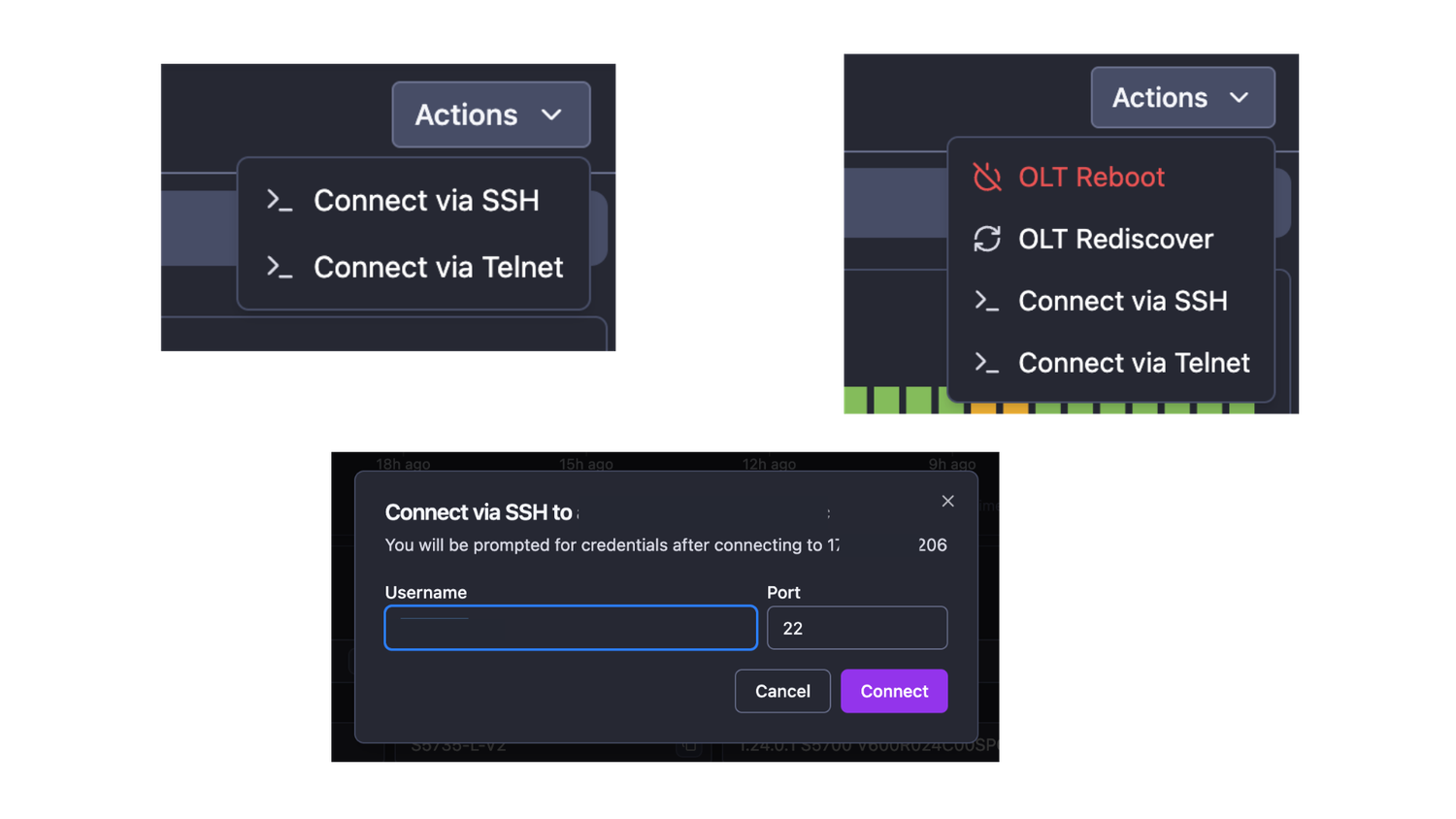
- New actions: SSH or Telnet to Switch or OLT directly from NetSense. Triggering SSH/Telnet will open your default terminal app to speed-up the terminal connection.
The SSH has the options to change the username and default port
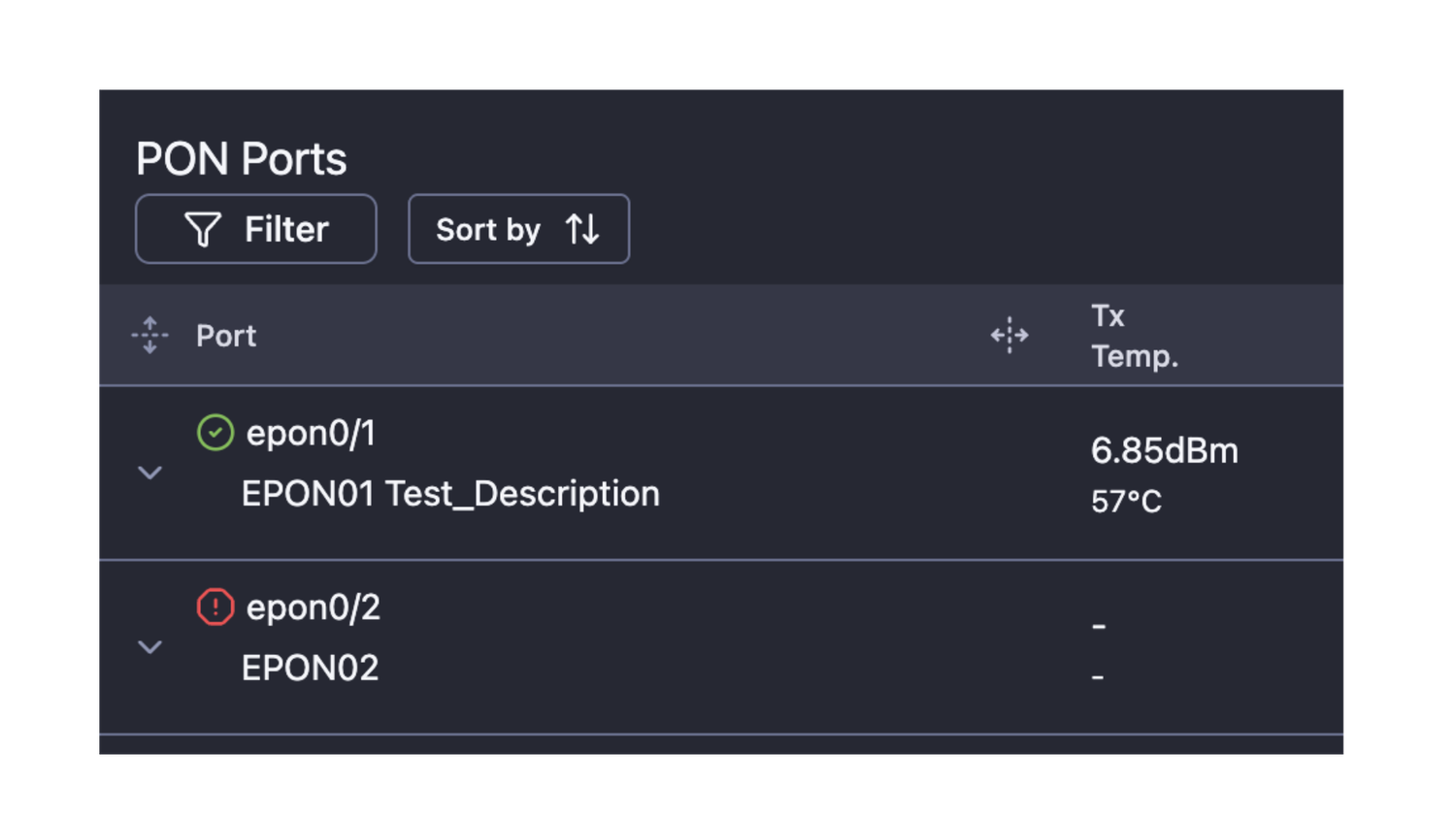
- OLT Ports description is captured and visualized
Enhancements
- Proper syslog messages processing for Huawei OLTs
- Proper syslog messages processing for GX Mars OLTs
Features
- OLT polling templates management - each Manufacturer - Model pair has been assigned a polling template automatically, based on model name and existing polling templates.
All templates are verified for compliance with devices from each Manufacturer - Pair.
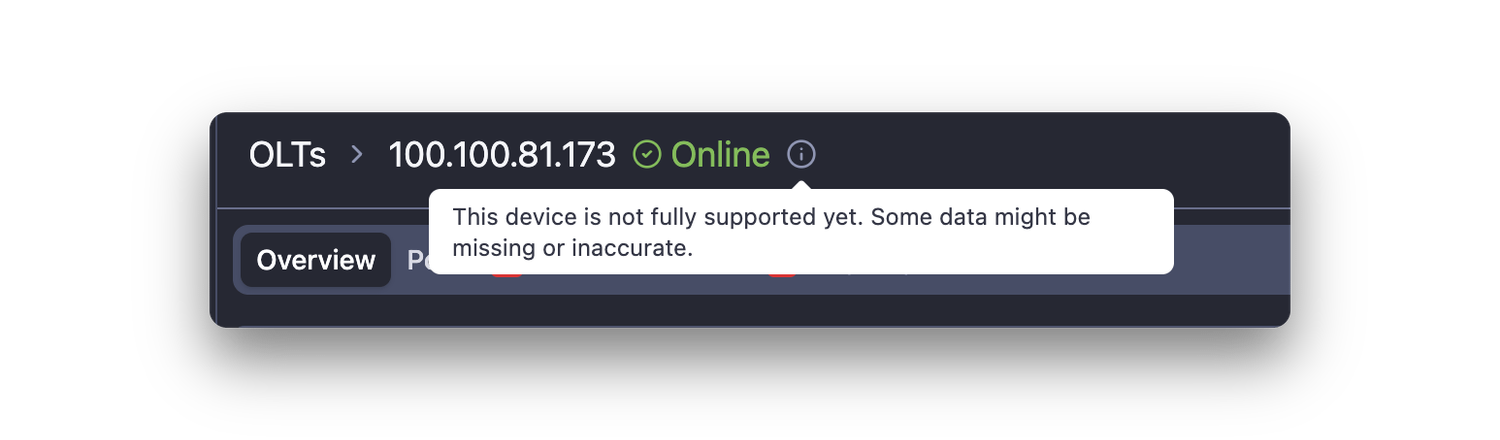
Devices that use unverified templates will be displayed with an integration badge
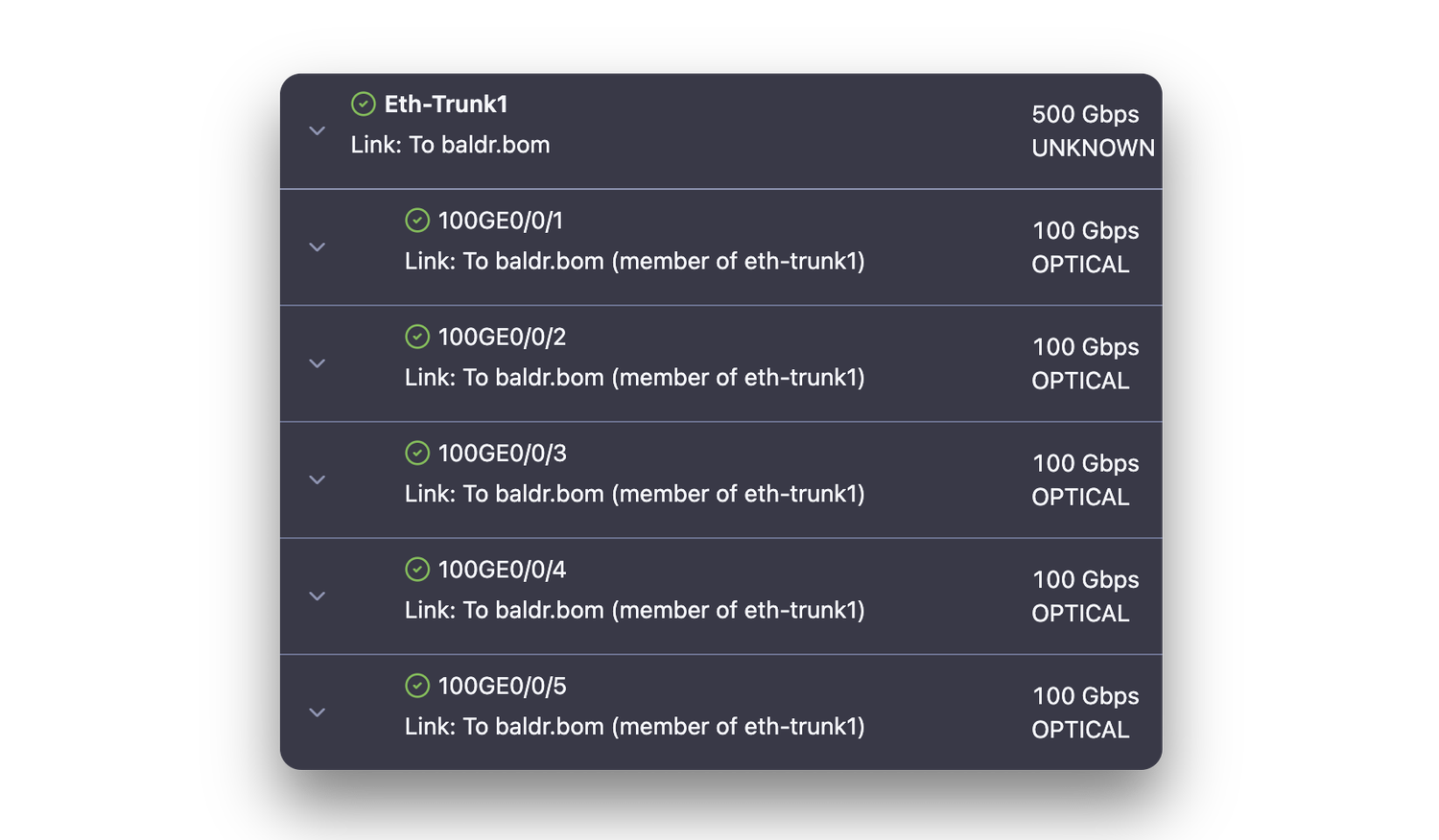
- Ports that are LAG members are displayed under each LAG
- Port LAG Membership is available as a message param in the alarm definitions
Enhancements
- Refresh in-view rows in tables - Every 5 seconds the rows that are currently in-view are checked if they are stale (timestamp + refresh_interval < now) and are then refreshed and have their timestamp updated
Integrations
- Huawei MA5608T OLT
- Huawei MA5800-X2 OLT
- RLTech RH8004ES_V2.1 EPON OLT
Bugfixes
- Fixed: A 401 error appears when the user logs out of NetSense
Enhancements
- Network Map module - an update of the module including:
- New element “Locations” has been added - it is a visual layer that can wrap over all devices in a certain location for better clarity
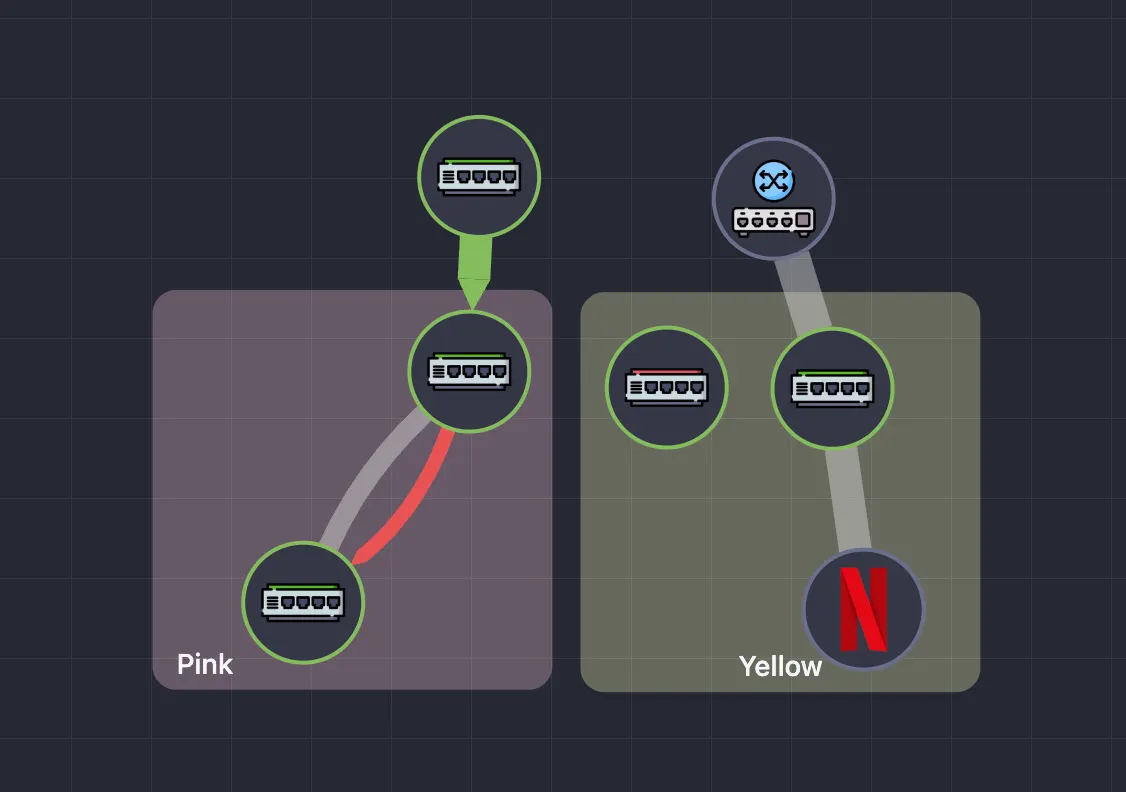
- Maps can be copied
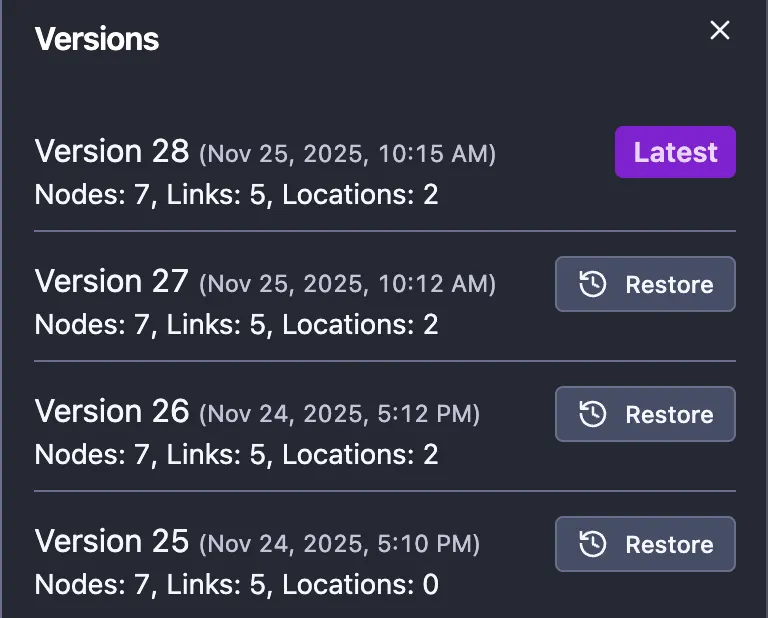
- Maps now have versions and backups of the previous versions can be restored
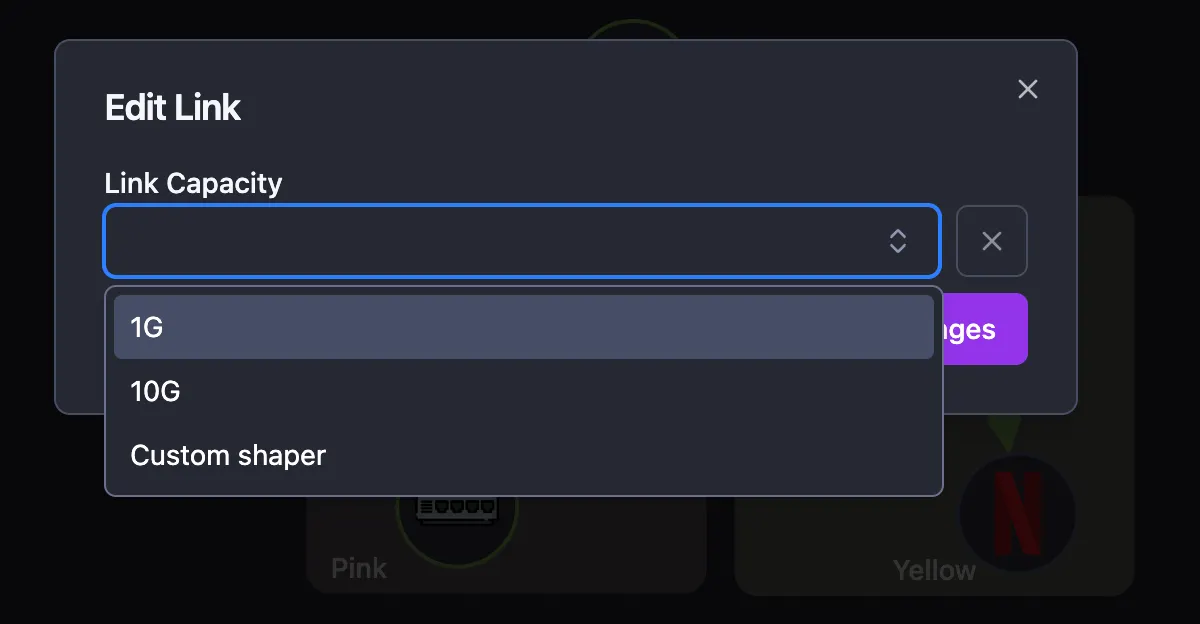
- Custom link speeds are available
- Visual indicator that a device has alarms - colored dot representing the alarm with the highest severity
- Visual indicator for errors or discards on the interface
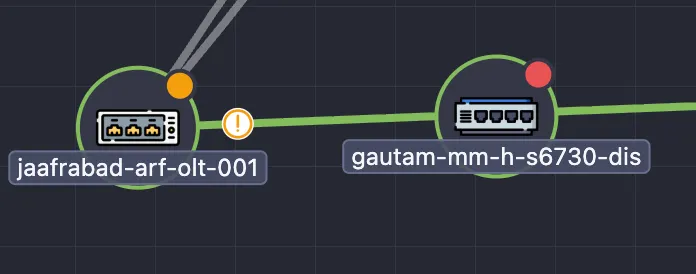
- All links has arrows that show the predominant traffic direction
- Additional icons have been added for the custom nodes
- Links between VLAN interfaces can be created
- NetSense Logo has been added to the sidebar
Features
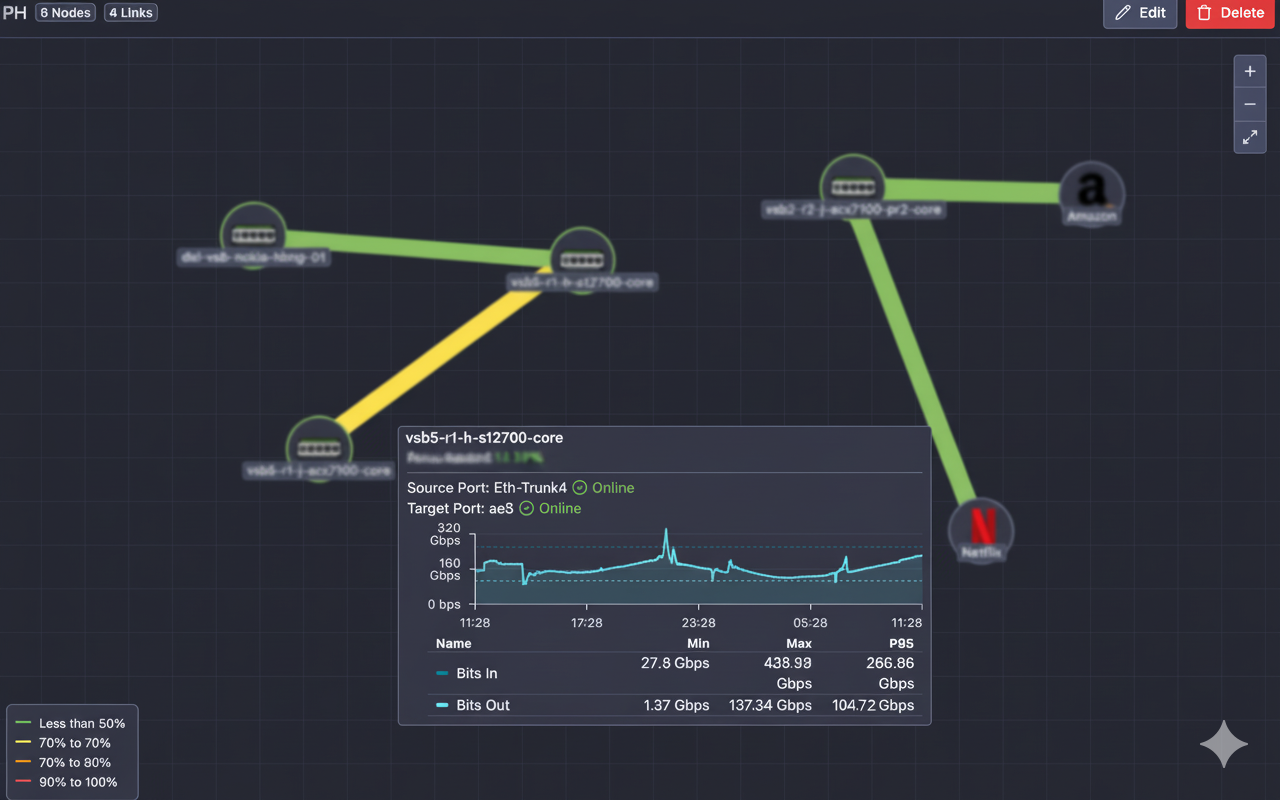
- Network Map module - a completely new functionality in NetSense allowing you to create network topologies by connecting devices in your network. External networks can be visualized and also connected.
WIth the Network Map feature you could represent your entire (or partial) network visually, giving you very good overall understanding if there are issues and how the devices are connected to each other.
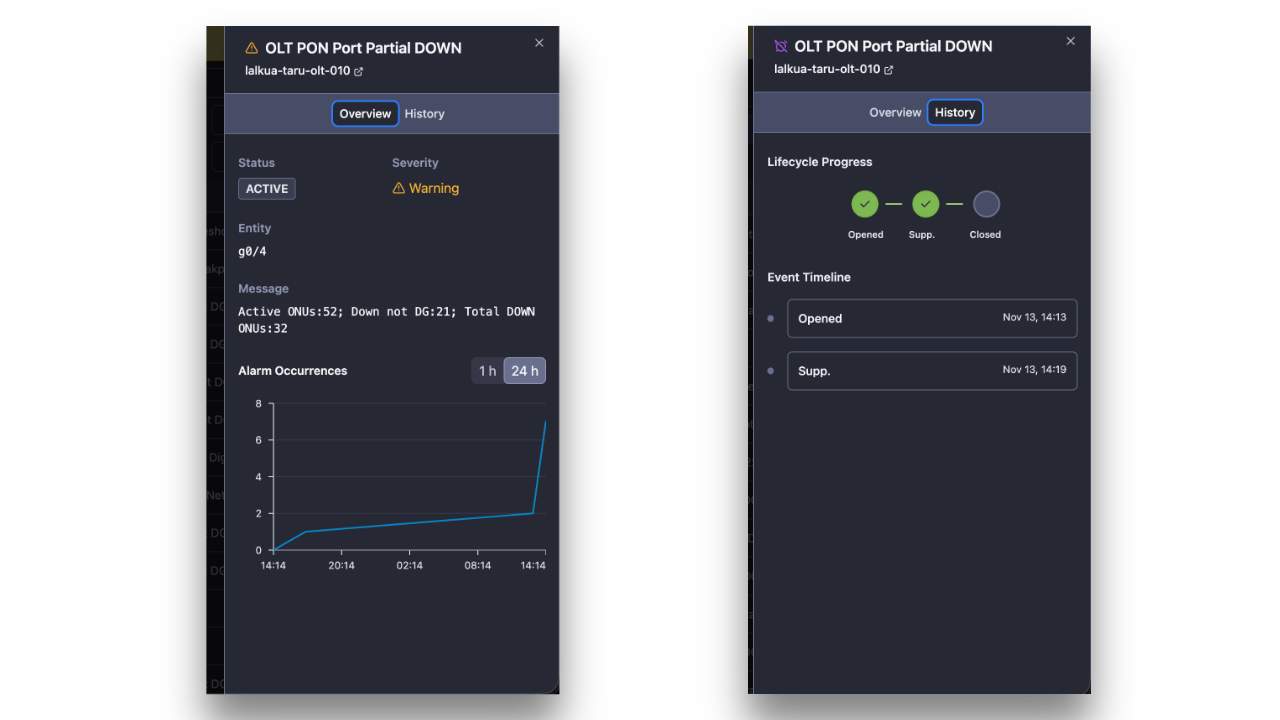
- Alarms extended information - each alarm now has an extended information panel where you can see:
- Alarm occurrences for the last 1 hour and the last 24 hours - useful to know if the alarm is new or re-occuring
- Complete alarm message - sometimes the alarm message is truncated and not displayed entirely in the alarm table view. In the extended alarm panel it is shown entirely
- Alert history - check status and timestamp of the alarm: when alarm occurred, when and what actions were taken so far.
Enhancements
- Suppressed and delayed alarms are visualized in the mobile interface
Bugfixes
- Fixed: Switches and Olts won’t visualize in NetSense interface if NetBox is down
- Fixed: The site crashes when switching from one page to another
- Fixed: Entering date manually for alarm suppression doesn’t work
Hotfix
- Fixed a defect in housekeeping routine removing ONTs from the DB that were not supposed to be deleted
- Mitigated removing the ONTs from the DB because of a specific behavior of Syrotech and Technxt EPON OLTs
Hotfix
- Add unformatted MAC address processing for ONTs in the APIs
- Remove deleted VLAN interfaces from UI after 4 hours
Features
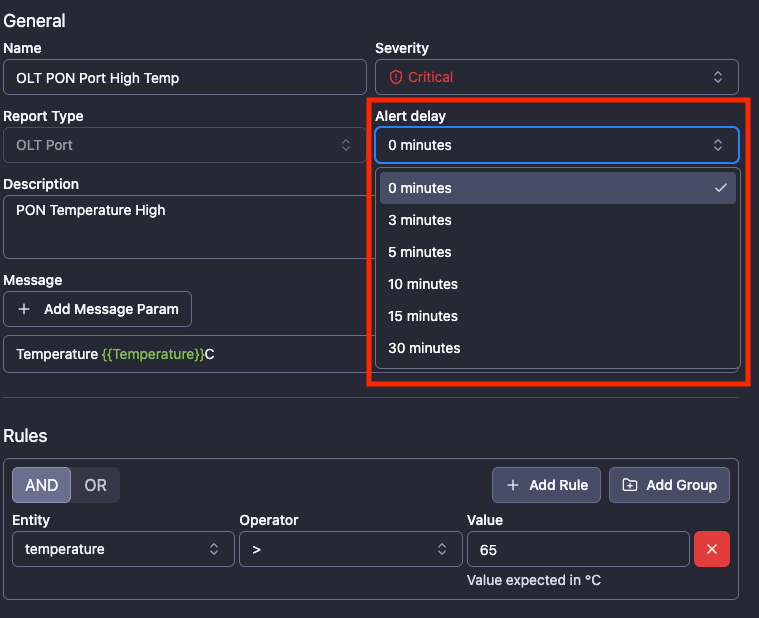
- Alarms delay - option to configure alarm delay time in alarm definitions - especially useful when you don’t want to receive an alarm when certain conditions occur but rather to wait 5 or 10 min. to see if the issue persist and only then to receive notification.
- Alarm suppression - another very useful option coming in two flavors
- suppress the alert until OK, which means that you won’t see the alarm anymore but if it clears and then appears again - new alarm notification will be triggered;
- suppress the alarm for a certain time - very useful when you know you work on an issue resolution and want to reduce the noise of the alarms so you can see all new alarms that occur
- Kindly note that the suppressed alarms are not visible by default but the filter can be removed
- How to activate - just select one or multiple alarms and the option will appear from the alarm actions menu
- MikroTik VLAN interfaces have been captured - ifname, IP addresses and traffic
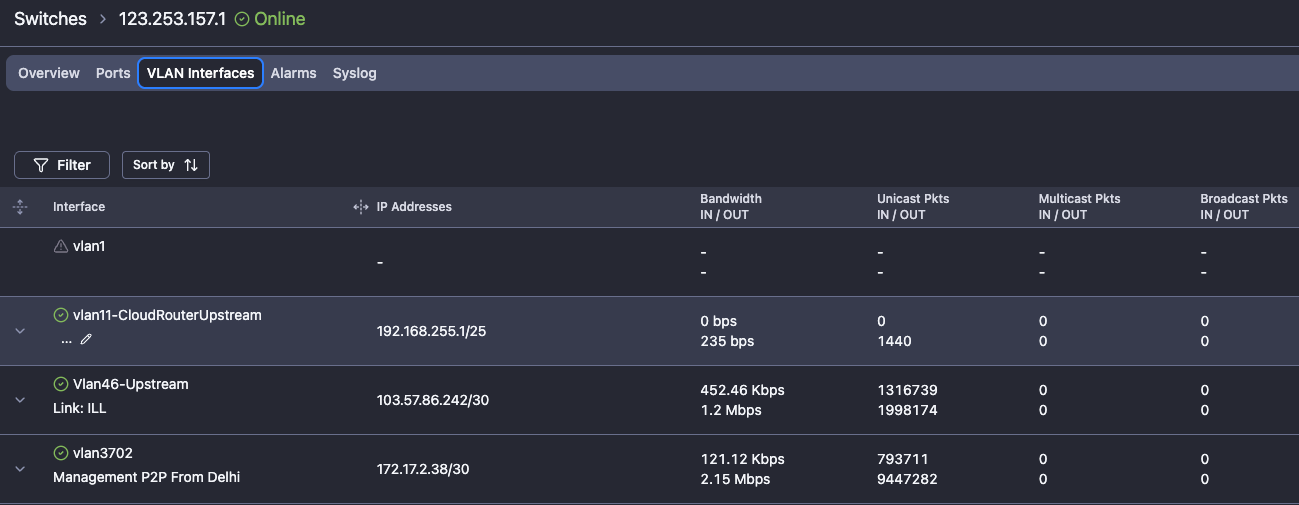
- Different management credentials for each device can be configured - this gives flexibility to use local accounts instead of depending on centralized credential management solution (like TACACS) which will ease the access to the feature for the Franchises
Enhancements
- Occupancy % of PON ports has been renamed to Port Fill % and now it is calculated by comparing online ONTs to discovered ONTs
- Chart visualization (graphs) on the ports has been enhanced so that the first charts always show data (bandwidth, errors, discards) and if then the optical performance params, if supported
- Mikrotik OID for system temperature has been changed - now supported by all models with temp sensor
- OID for Rx/Tx OID in S6730-H24X6C and S6730-H48X6C has been changed and now those params are captured more accurately
Bugfixes
- Fixed traffic counters issue for Syrotech/Technxt (all VSOL-based) OLT models
- Changed the OIDs for traffic capture on Huawei switches - the counters in IF-MIB are updated once a minute and this introduced a bug
Features
- Capture Rx power on disabled ports - ensuring that the backup links are with good optical levels is critical for network operations. With the feature to fetch Rx power on disabled ports we have this covered. Even if the backup link is disabled, when the Rx level is not good - an alarm will be generated for proactive notification
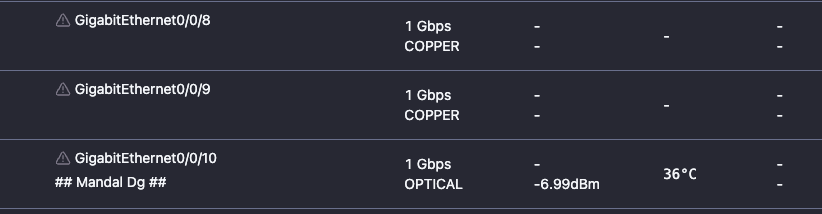
- ONU Reboot API - rebooting ONUs is now available on API endpoint
Enhancements
- Updated Rx/Tx calculation logic based on Huawei Firmware version and model
- ONUs without update for more than 30 minutes are queried twice an hour
- Updated logic of the ICMP agent - increased buffer size
- Alarm name has been added as information in OLT Info API
- Device System and Port charts now show min, max and P95 values as well
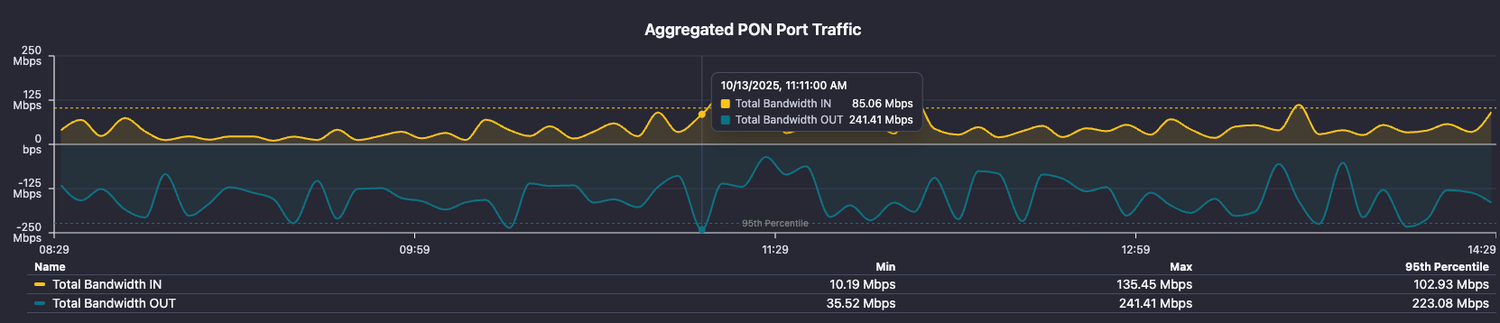
Bugfixes
- Fixed: Some issues with management operations for Optilink OP-970 and OP-944 and GX Saturn
- Fixed: Some alarm definitions visibility in the UI
Integrations
- Integrated: MAIPU S3300-12TXF-AC Switch
- Updated: Optilink OP-EOLT-74408E integration
Features
- New enhanced ICMP (Ping) tool in NetSense - it is more robust, lightweight and accurate than the old tool and provides very accurate statistics about the packet loss and latency to the devices
- New filtering and sorting options for OLT PON and Uplink Ports and Switch Ports
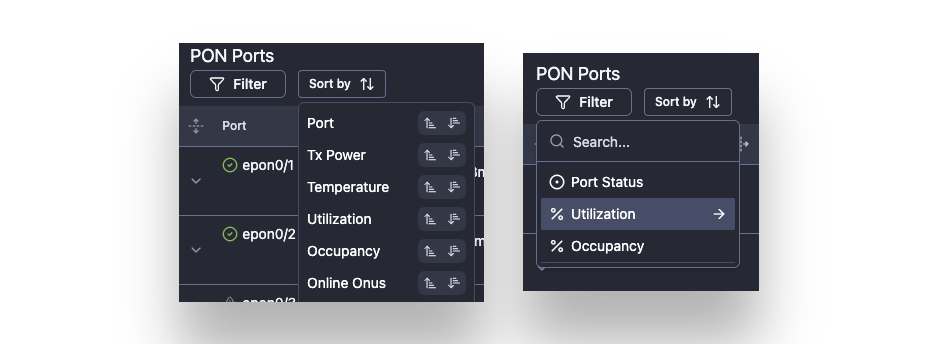
- Refreshed and better look of the OLT PON and Uplink Ports and Switch Ports

- SiteID, ZoneID, and PartnerID as properties to Devices in the Inventory module
- Field engineers now have access not only to the mobile version of the NetSense but also to the web version - the switch is seamless and it depends on the screen resolution and touch points presense
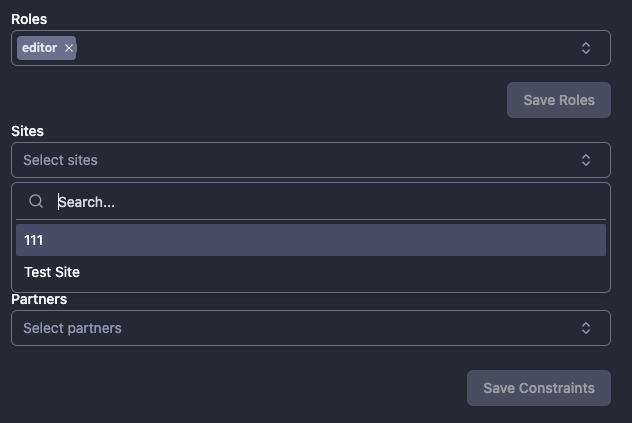
- User’s metadata such as Site IDs, Zone IDs and Franchise IDs can now be edited from the user management menu
Enhancements
- Proper Syslog processing of Optilink OP-744 OLT
- API enhancements
- Media Type in Switch port alarm definitions that makes the alerts more accurate - for example: now you can chose to run any alert rule only on Optical ports
- Mobile view enhancements
- New tab “Uplinks” in OLT Details view
- “Show disabled” toggle in all port views - by default, disabled ports won’t be visible which will reduce the number of the ports to scroll when you need to find the one you are looking for
- PON ports additional information: Online/ Down/ Discovered ONUs
- ONUs additional information: Link Attenuation, QoE, Availability, Uptime, Description
Bugfixes
- Fixed some management functionality issues with some of the OLT models
- Fixed "Dying gasp" down events are sometimes recoded as "Optical fault" in the ONU view page
- Fixed No proper processing of DOWN and UP events for the ONUs on OP-EOLT 9702 Models
- Fixed PON port status not reflected properly in ONU details page
- Fixed Cannot open https://excitel.netsense.app without adding North South or West
- Fixed Opening North and South NetSense instances cause constant screen refresh
Hot fix
- Fixed mobile view FE issue
Features
- OLT Uplink ports monitoring in Mobile view
Features
- Added EXPORT option for all reports - now all report data can be exported and analyzed for detailed insights
- New ONU Params: Rx Power (PON Port), ONU voltage and OLT-ONU Fiber Loss (Attenuation)
Enhancements
- Updated ONU polling algorithm - introduced a back-off feature that tries to poll less frequently the ONUs which are down since a long time. As a result, the ONUs without update are polled faster and more frequently
- Added full timestamp (HH:MM:SS) in the ONU syslog
Bugfixes
- Fixed: Rediscovery is not working for OP-744 model
Features
- Added default Rx and Tx thresholds for switch SFPs if they are not reported
Bugfixes
- Fixed: issues with report data
Features
- MikroTik switches and Routers integration
- New entities have been added to the Alert definitions
- Hostname filter
- Manufacturer and Model
- ONU down reason (not Dying gasp or SNMP)
Bugfixes
- Fixed: issues with report data
Hotfix: Partial PON Port DOWN Alert: Enhanced logic (removed SNMP down as a reason)
Features
- Partial PON Port DOWN Alert - An absolute number of the DOWN ONUs or ONUs DOWN not because of dying gasp can be configured against a baseline. When the baseline is breached - alert will be created. When the number of the DOWN ONUs with the preselected criteria is not breaching the threshold and there is an alert - it will be closed.
- ONU Uptime and description are captured and visualized in the ONU details
- Inventory management module - A new, user-friendly module for adding and deleting devices in NetSense has been developed. This module will be decoupled from the Netbox platform and will use a local DB instead.
Enhancements
- The position of the actions menu that appears on OLT details has been changed to allow seamless page navigation (switching between pages)
- QoE and Availability columns in ONU list are sortable
- Switch and OLT "Previous status" param were added in Alarm definitions - this will allow for more granularity on the alarm rule description and can eliminate the false positive alerts for “Switch/OLT Rebooted” when the SNMP connection to the device time out
- Dashboard widget for top 10 devices with the highest polling duration (Switch and OLT)
- Enhanced Switch and OLT model matching to polling template
Integrations
- Genexis: Mars MOLT33-08P OLT
- KHWAHISH: KOLT-4804 EPON OLT
- Uniway: UW-GPON-L3 OLT
- Digisol: DG-GO4204-8E and DG-GO4208-12E4SFPP OLTs
- Generic OLT (when there is no match to the model)
- Raisecom: ISCOM S2600-8T4X switch
Hotfix: Fixed Issue with Contains and NOT Contains operators in Alert definitions
Hotfix: Fast Polling
Features
- OLT and Switch Fast Polling - The logic of the polling has been changed from a scheduled polling every 5 min. for the OLTs and 1 min. for the Switches to a proactive Daemon process running in the background and constantly checking which devices weren’t polled for a particular time interval (40 seconds for Switches and 3 min. for OLTs) and polling them asynchronously.
As a result, more data points are being recorded in the DB and more granular telemetry is presented in NetSense; The CPU load is smoother and more predictable (flat). The spiking behavior which was caused because of the scheduled polling is mitigated.
Enhancements
- Colors across menus, charts and widgets have been unified
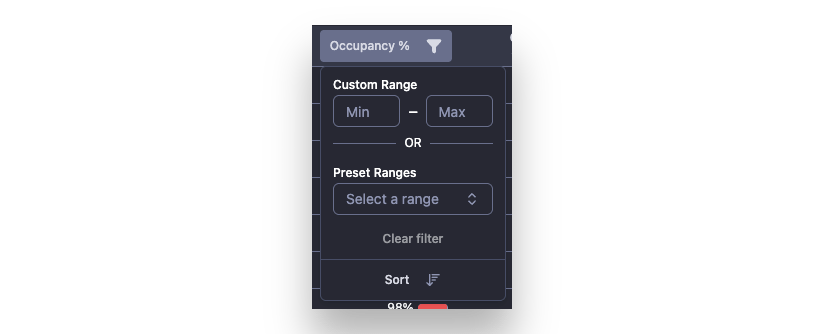
- Utilization and Occupancy filters in the OLT Port Menu were changed so that now a custom range for filtering can be defined, apart from the predefined value. This gives a lot of flexibility for the users wanting to see all PON ports with Occupancy between 60 and 90% or between 5 and 15%.
- Added scrolling to the table column picker menu
- Improved Rx visualization
Bugfixes
- Fixed: Using the "Status" filter at the OLTs list page disables all other filters on the page
- Fixed: Pagination automatically returns to page 1 after 30 seconds on Switch/OLT view pages
Features
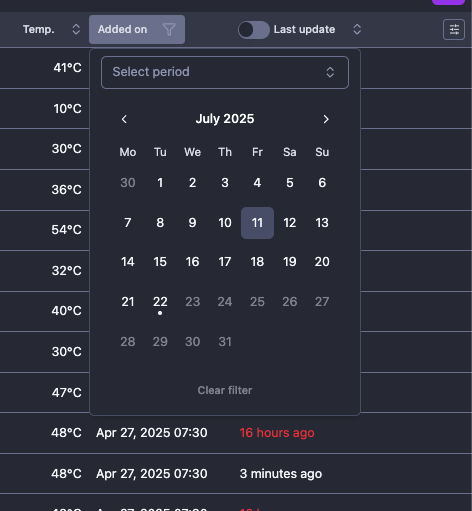
- Added ONU created time with filtering by date and time in the ONUs grid view
- Allows you to easily filter devices added today or maybe last week and check their current parameters. Answer the question: Are my new customers having good internet experience?
- New device integrations:
- Optilink OP-EOLT 74408E OLT
- EdgeCore ECS2100, ECS4210, ECS5520 switches
Features
- OLT
Features
- Uptime widget in OLTs and Switch details view - it shows uptime of the selected device for the last 24 hours, last 7 days or last 30 days and each bar represents a chunk of time with individually calculated uptime for that chunk

- New integrations: Raisecom ISCOM S3600-24S8T6X-AC/D switch
Enhancements
- Dashboard UI has been revamped. Now it has minimalistic but more clear interface
Bugfixes
- Fixed: A bug in the Telegram relay - <nil> in the alarm message causes a problem when sending alerts to Telegram
- HOTFIX: Fixed the time picker preset do not update the charts time range
- Changed default QoE and ONU Availability from Weekly to Daily
Features
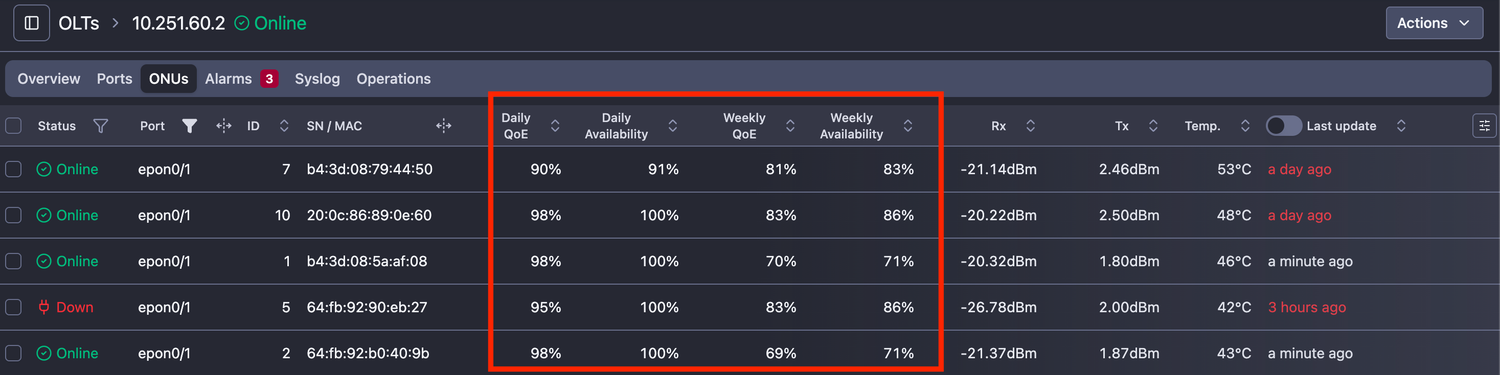
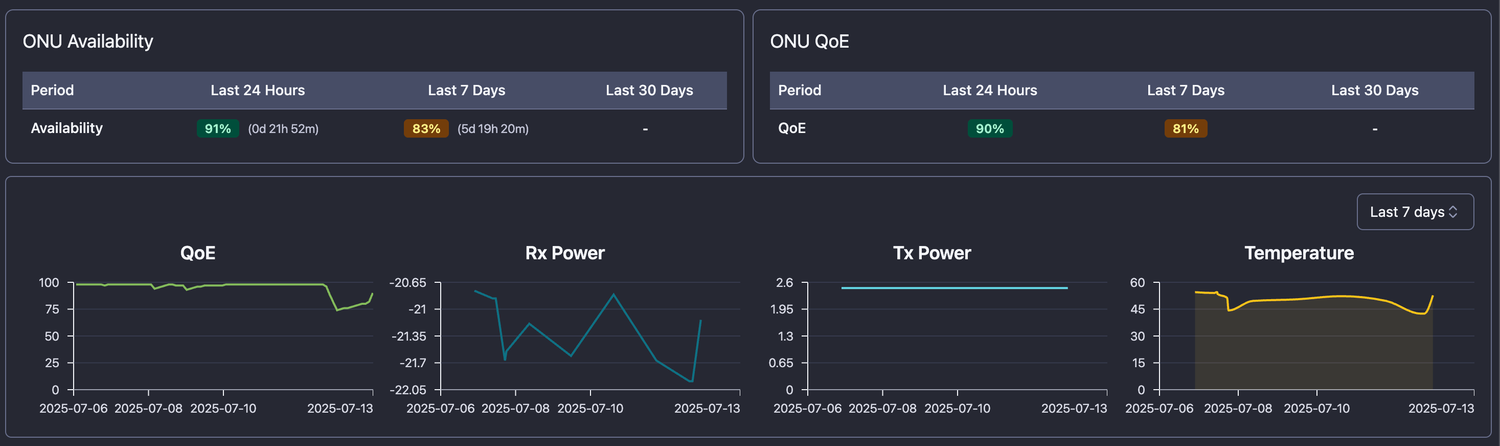
- ONU Quality of Experience (QoE) - it is a compound index showing the quality of service each subscriber is experiencing. It is based on ONU, PON port, and OLT uptime, performance, and optical params.
- ONU availability gives comprehensive information on whether the ONU had any downtime during the selected period
- ONU QoE gives an insight into the quality of its availability, because being present is not sufficient anymore; Network stability, good optical params, and performance also matter.
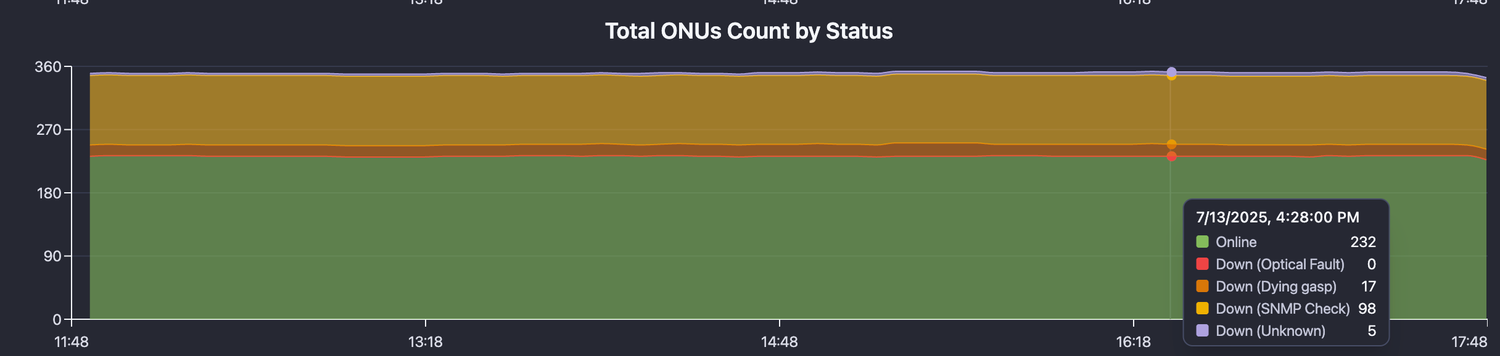
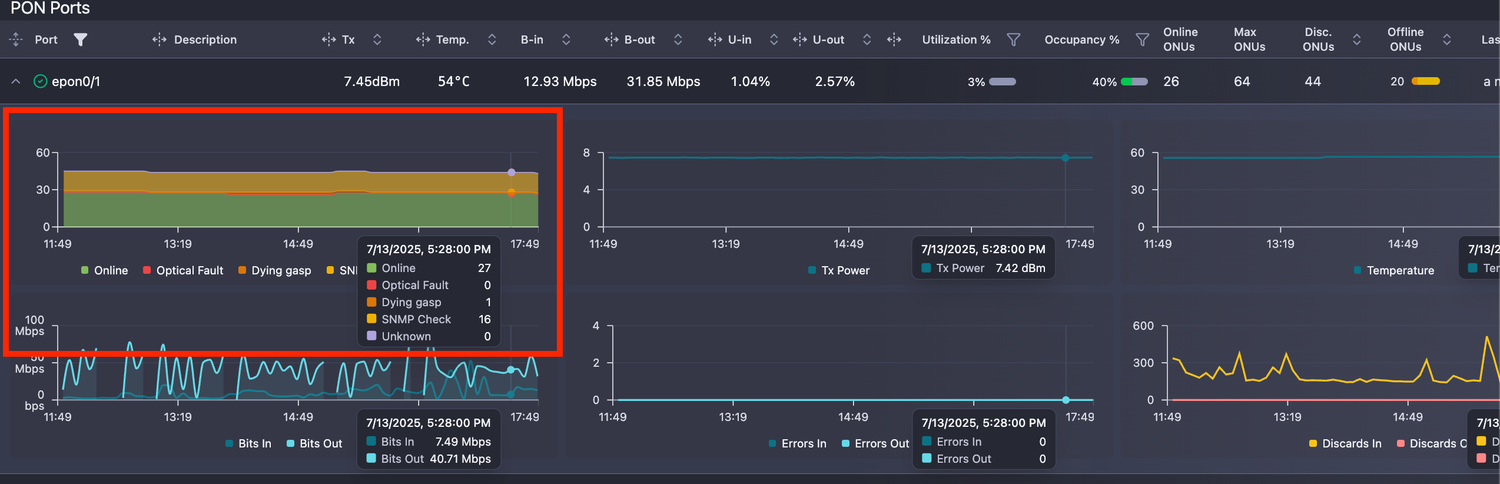
- ONU Count charts - it gives a status breakdown of the ONUs for the selected period, OLT-wise and Port-wise
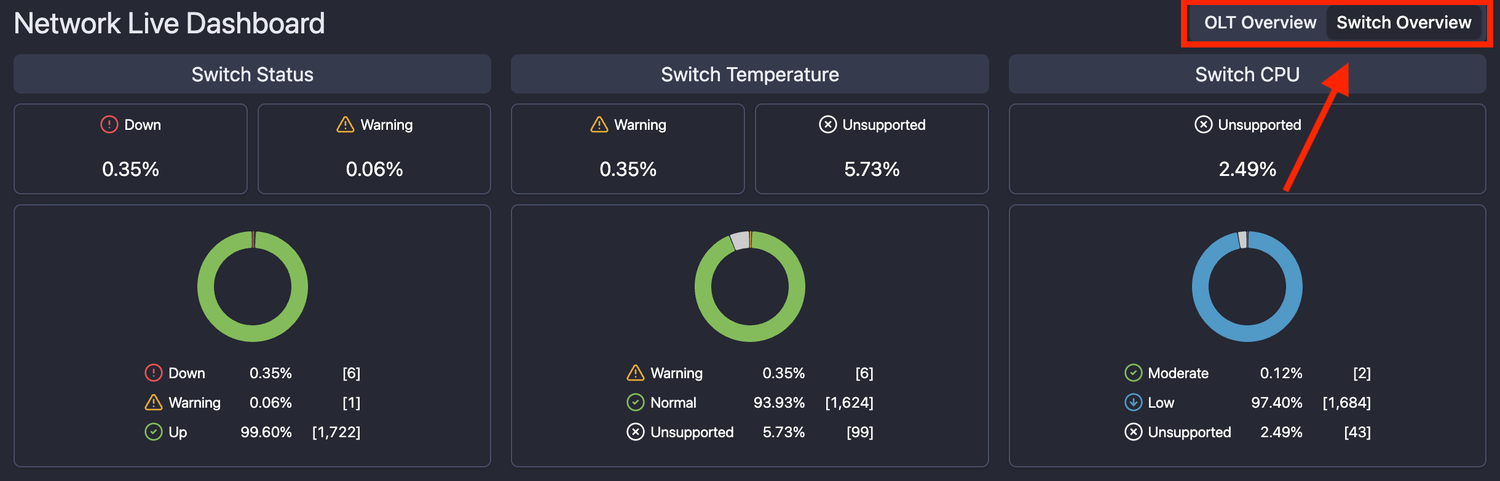
- Switch dashboard - explore the insights provided by NetSense about the core network in real time by looking at the Switch dashboard. Switch between OLT and Switch view with ease
- Banner notification on new NetSense release - each time NetSense has an update, a banner will appear notifying users about the newest features and enhancements. It has a link to the change log where you can see details about what’s new and what’s changed
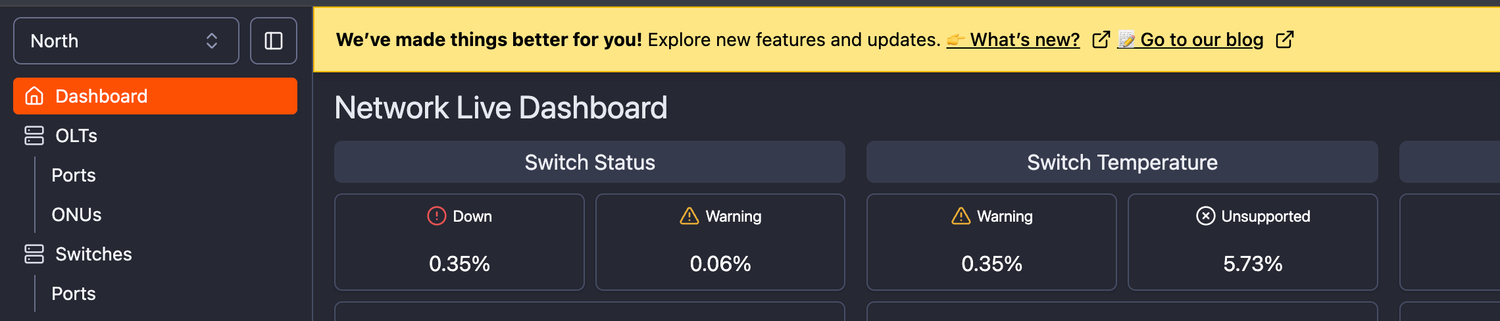
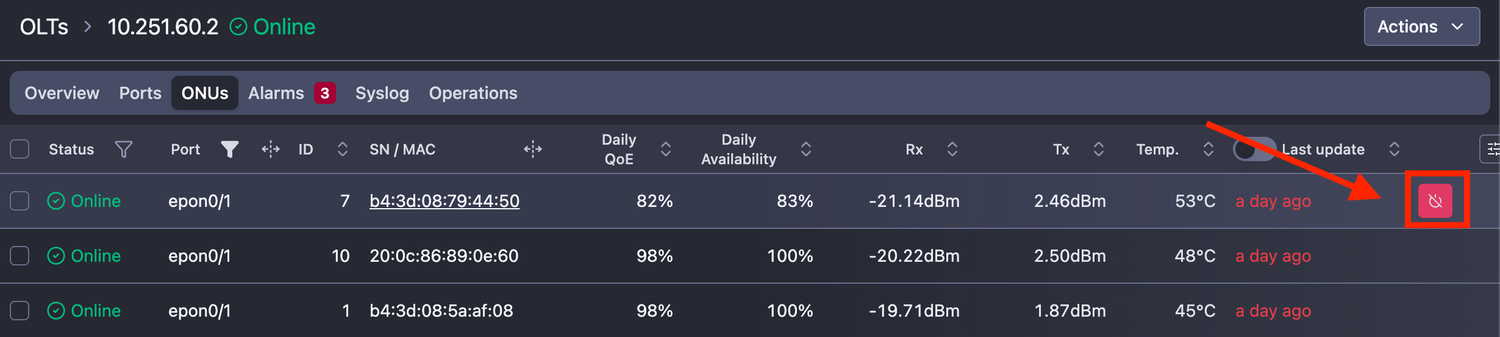
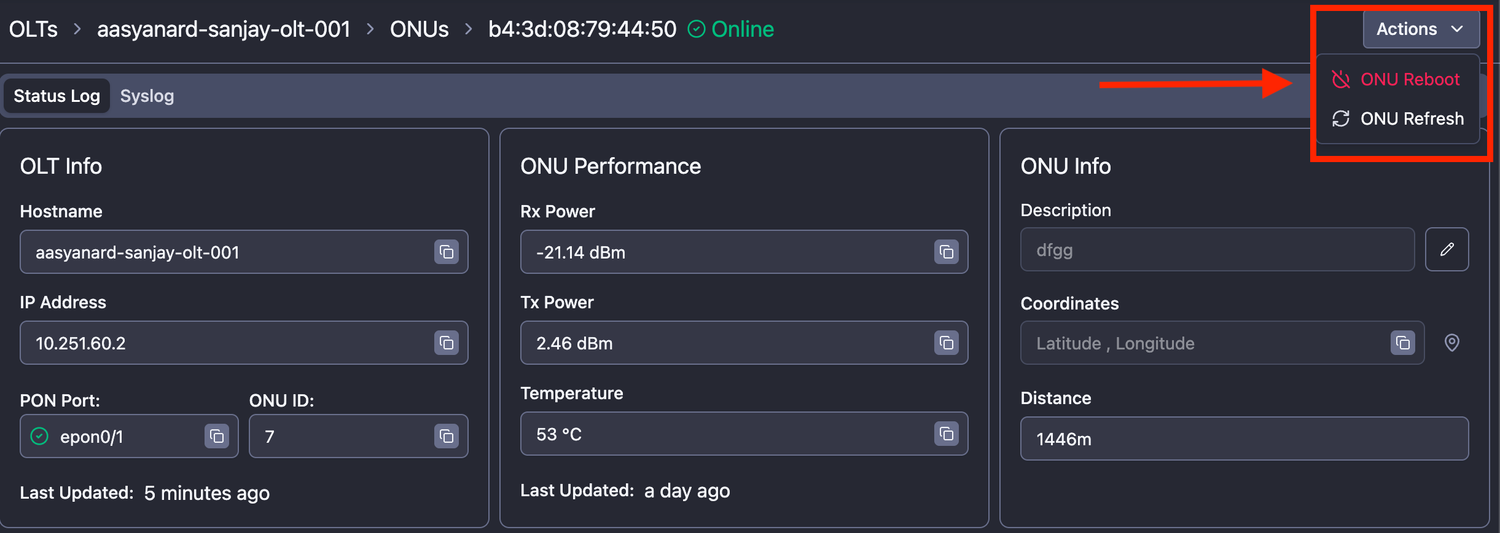
- ONU Instant Reboot - new management functionality that gives the users the ability to instantly reboot a single ONU from the web UI without the need to log into the OLT and execute the command - the feature is permission dependent.
- You can reboot any ONLINE ONU by simply hovering over the row and clicking on the “Reboot” button
- Or navigate to the ONU details and reboot it from the “Actions” menu
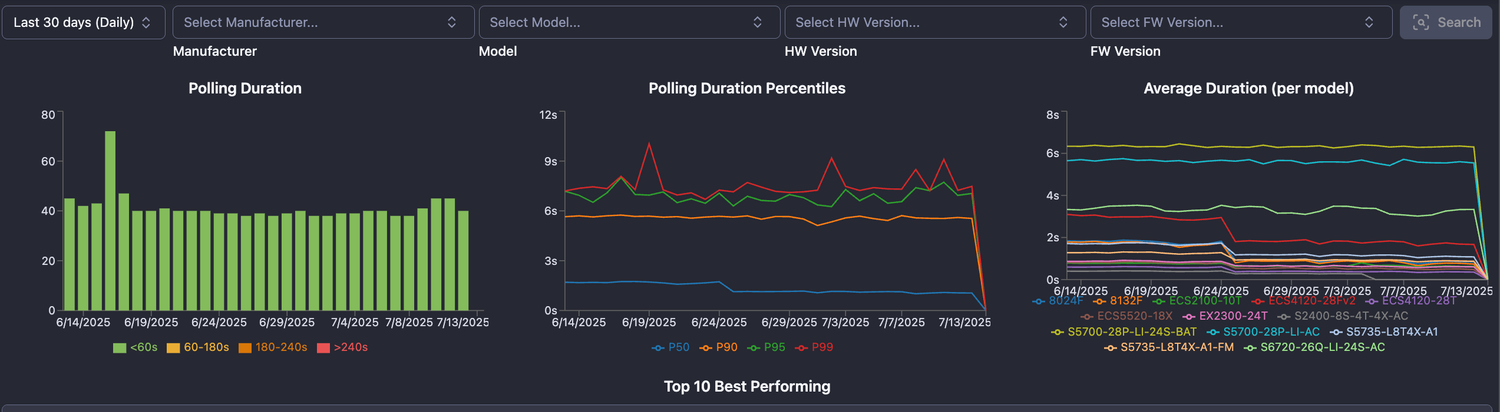
- Switch and OLT polling performance report - it provides comprehensive insights on the polling performance, identifying best and worst performing devices and comparing different models. It is invaluable insight when a decision for a new device purchase is to be made or to spot poorly behaving devices
Enhancements
- Unified Packet loss and Latency chart colors across different views - reduces the “color poisoning” and simplifies the data visualization. It makes it easier to relate what each chart is for
- Context-aware filtering for OLT and Switch tables - depending on the active filter and selected information, the data available for choosing in the rest of the filters is dynamically updated. This reduces the overhead and frustration of needing to know by heart how the data in the different columns relate
Example: If the user selects OLT Manufacturer Optilink - the rest of the filters will contain only data related to Optilink, such as Optilink Models, Firmware, and Hardware versions
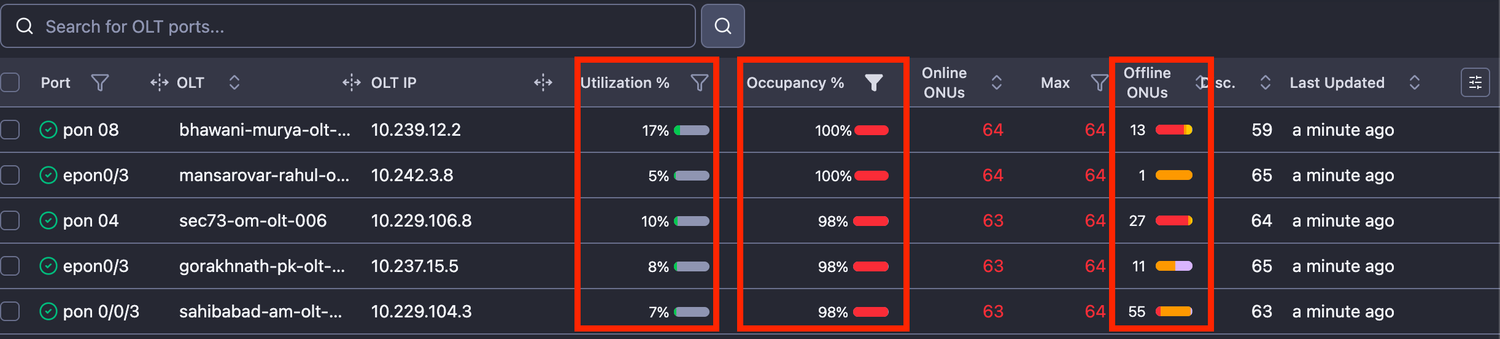
- OLT ports menu revamp
- Changed overutilized to Port Occupancy - it shows the occupancy ratio in % (how many Active vs. Max ONUs) for the PON ports
- Added the Offline Down reason breakdown
- Added PON utilization in %
- Enhanced filtering options
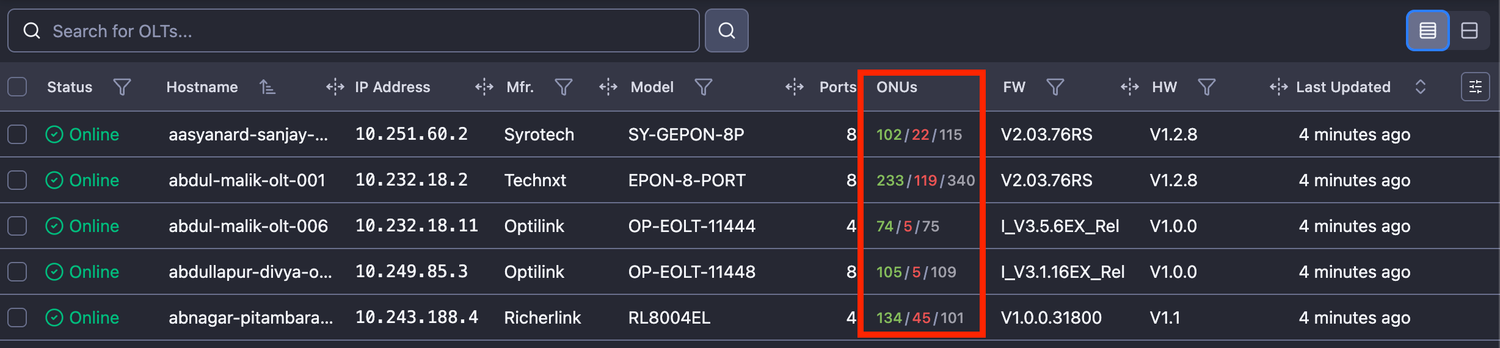
- Active/Down/Registered ONU breakdown in the OLT list table
Bugfixes
- Fixed: Missing/inaccurate information about the port for Optilink OP-924 models OLT
Features
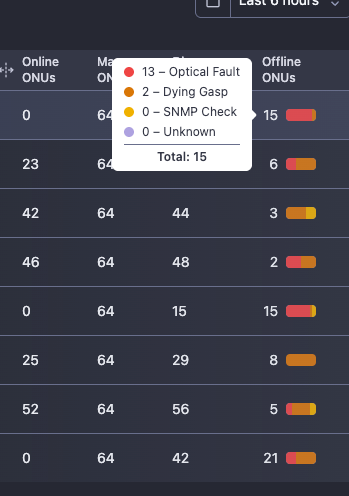
- OLT PON Ports Grid - show offline ONUs as separate column (segregated by down reason) - the offline ONU information has been enhanced: Now the down ONU count has a tiny colorful chart representing the percentage of the ONU down for each reason. This way, you can quickly determine the whether the vast majority of the ONUs are down due to a fiber cut or dying gasp
Enhancements
- Updated UI components, charts, etc.
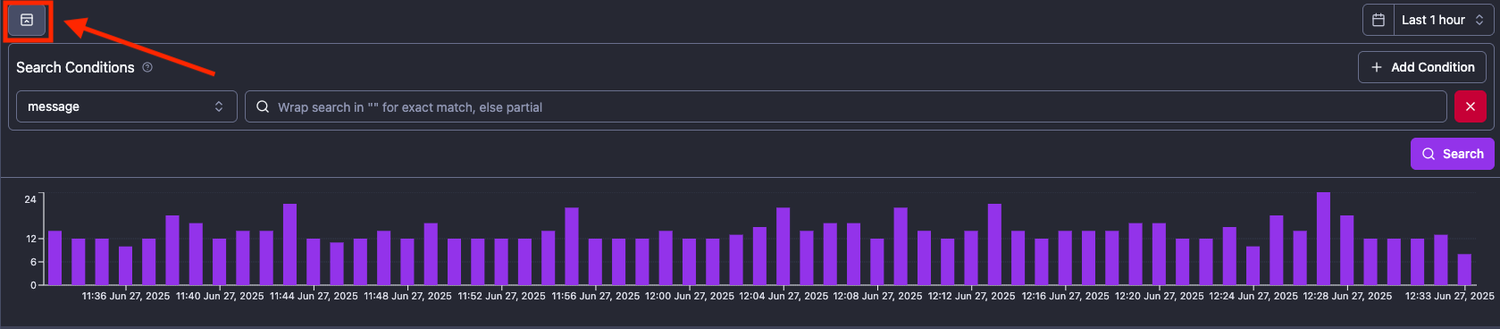
- Toggle button that shows/hides Search and Message count chart has been added to single Switch/OLT Syslog view
- Port description cache has been removed for disabled ports - when a port description is removed and port disabled - it will reflect in the next polling cycle
Bugfixes
- Fixed: Syslog toggle button closes and re-opens all elements when clicked
- Fixed: Syslog messages count chart in Switch/OLT view to reflect the proper amount of messages
- Hostname and Status are not shown in the OLT/Switch view->Overview tab in Field Engineer mobile view
Features
- Integration of another OLT model: Metro V1600D (EPON)
- V1600D4 - for 4-port EPON
- V1600D8 - for 8-port EPON
- V1600D16 - for 16-port EPON
- CONTAINS and NOT CONTAINS operators have been added in the Alarm rules definition - allowing to filter by partial or complete match in all “string/text” fields and creating very-specific alerts that are tailored to your use case.
Example: You can create a separate alert for Port DOWN matching a specific port description, adjusting the severity and routing it to Telegram for immediate escalation.
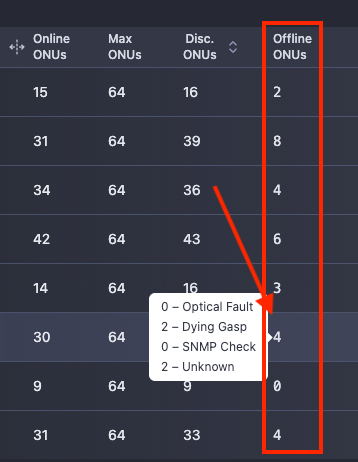
- PON port table in OLT details view has a new column - Offline ONUs. Hovering over the count shows you a breakdown of the ONUs by down reasons:
Enhancements
- Syslog now has the following options
- Hide the message count chart and query builder so you have more space (full screen) for data analysis

- Columns width is expandable - giving you the possibility to focus on the message column and enhancing message readiness
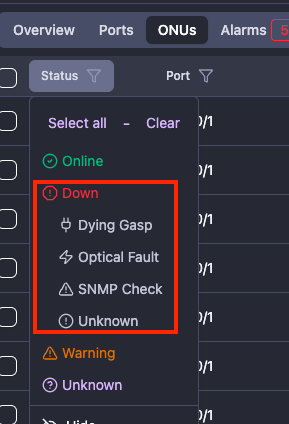
- The status filter in the ONU tables has now the option to filter by the ONU down reason - providing more granularity and understanding how many ONUs are currently offline and why
Of course, the option to select all DOWN ONUs regardless of their down reason remains.
Bugfixes
- Fixed: The names of ports for the OLT model OP-GOLT-92408A are mismatched and not in ascending order
Features
- Integration of another OLT model: Fibrsol V1600D (EPON)
- V1600D4 - for 4-port EPON
- V1600D8 - for 8-port EPON
- V1600D16 - for 16-port EPON
- Common Syslog Interface - a dedicated Syslog interface is accessible directly from the NetSense sidebar menu, providing easy access to the syslog messages from all network devices, making almost redundant use of the Graylog interface. It has 2 types of queries:
- Visual query builder - for quick and simple syslog queries
- Raw editor - with Graylog-like query syntax, for more advanced users wanting to write more complex queries
- New reports
- A report on ONU Rx signal level distribution has been developed - with this report the user could see how the ONUs Rx signal has changed for a certain period of time enabling them to quickly track the effectiveness of initiatives related to ONU Rx power signal improvement
- A report on closed Alarms has been developed - providing comprehensive overview on the alert count for each alert definition and the total number of alerts. This enables the users to spot and track unusual patterns and trends related to the network performance
Enhancements
- The integration of the Edgecore 7716-24SC-0SE-F now includes information about the coherent ports such as Rx, Tx, Temp, Laser Frequency, OSNR and BER
- The NetSense Mobile view has now the functionality to refresh the ONU status and params in real-time enabling the ground teams and Partners to analyze ONUs performance in an ad-hoc manner. Especially useful when a customer related issue was rectified and the engineer should check the ONU performance - now they can do it on their own, without the need to wait to receive this information from the back office team (NOC or TAC)
Bugfixes
- Fixed: No downtime was displayed for switches and OLTs in the POP view (NetSense Mobile)
- Fixed: Accessing the OLT view->ONUs tab in Engineer view is producing an error for some devices
Features
- Integration of EdgeCore 5916-54XM-O-48V-F and 7716-24SC-0SE-F models
- Integration of Ufispace S9600-56DX and S9600-64X models
- New traffic aggregated graph in Switch and OLT Details view
- Aggregates all PON port traffic in the OLT details view
- Aggregates all switch port traffic in the Switch details view
- New widgets for TOP 5 Highly utilized by traffic PON ports and switch ports in the OLT and Switch details view
- New report for PORT utilization has been added in the report section
- Errors and Discards on the switch ports have been added
- "Previous" Rx and Tx power can be added as message param in Switch Port Alarm definition
Enhancements
- Default syslog view for the devices has been changed from 5 min. to 1 hour for better visibility
- Enhanced “OLT Rediscover” process to capture all connected ONUs status and params
- Enhanced alert relays logic - improved retry mechanism and updated JSON structure
- OLT reboot and OLT rediscover functionalities have been migrated under the new ACTIONS button in the OLT details view
- Logout button has been added to the mobile view. Next Heroes app release will use it for silent logout when an ERP changes window account
- NetSense Mobile view enhancements
- MAC address/SN is visualized in ONU details
- Online and registered ONUs count is visualized in PON port details along with the Tx and description
- PON-related information was removed from switch details
- Return to POP button has been added for navigation enhancement
- Search and filter by Partner name has been added
Bugfixes
- No bugs were fixed
Features
- Alerta integration in the NetSense Alerts UI - alerts can be easily configured to be routed to a desired environment of Alerta from the NetSense UI (before that it would require development effort and NetSense release)
- Alert relays: Allow for alert notifications from NetSense to be sent to Telegram Groups and custom WebHooks - configurable from the UI
- NetSense Reports - a new feature providing useful insights from the data captured from device polling and recorded events. Starting with System metrics, and will continue to add more reports
- Huawei switch models CE6881-48S6CQ, CE8851, CE8861 are now fully integrated with NetSense
Enhancements
- ONU log has been enhanced to show the ONU uptime duration and the offline reason. It is accessible in the ONU View.
- Huawei S6730 stacked 100G ports are being captured in NetSense
Bugfixes
- Fixed: Visual bugs in the dashboard page
Enhancements
- Display the full Syslog messages, non-truncated
Features
- Include port TX power in ONU CSV export
Bugfixes
- Fixed: Ports cannot be deleted
- Fixed: Custom description for ports is not working
Features
- Syslog integration on a device level (OLT and Switch) - a dedicated Syslog tab in the OLT and Switch details where the user can see all syslog-related messages for the device
Enhancements
- The switch port description is visualized in the mobile version of the NetSense (accessible via the Heroes App). If there is a custom description added via the NetSense - it will overwrite the “normal” port description
- Some improvements in the UI related to the user management
- Enhanced Netbox-NetSense sync script that now will update information about devices from Netbox to NetSense in real time.
Bugfixes
- Fixed: Visual bugs in the dashboard page
Features
- Users Authorization - automatic assignment of roles - this feature has been completed but still will require one-time work to sync the existing users
- User profiles metadata - user profiles in NetSense have metadata (Partner ID, Zone ID, Site ID). This metadata will be used with a combination of roles assigned to create a filtered view for the user (example: User role: Partner employee + metadata Partner ID=123 will be able to see only devices associated with Partner ID 123)
- Alarm definitions duplication - Alarm definitions can be duplicated within the Tenant or copied to other Tenant
- Added integration for the following Huawei switch models:
- CE6881-48S6CQ
- CE8850-64CQ-EI
- S12700E-4
- S12700E-8
Bugfixes
- Fixed: Incorrect dashboard threshold boundaries
- Fixed: Filtering in olts/onus and devices alarms tabs
- Fixed: Some minor issues in the UI
Features
- New OLT Integration - Sharp. It is the same like Syrotech/Technxt EPON models
- Add ONU export option on ONU select in OLT -> ONUs tab
- OLTs and Switches Ports are moved to a separate tab - in the Overview tab are displayed only the DOWN ports
Enhancements
- OLTs Ports page to apply utilization filter only when no other filters are active
- Update device integration to match partially with the model template (device type)
- Allow Excitel to login automatically with Auth0 - no screen requesting to use Auth0 during the login process - for the custom mobile views only
- Filter Alerts from the “Top 15 Active Alarms by Type” Dashboard Widget
- Zone devices - when clicked on a device - open it in a new tab
Bugfixes
- Fixed: OLT mass reboots fails if scheduled at the same time
Features
- NetSense MGMT - OLT Reboot
- Device uptime is added in OLT and Switch Port-related alerts and it can be used for customization
- Switch port Rx/Tx Threshold values for S5735-L8T4X-QA-V2 are now captured
- User permissions and authorization in NetSense - not currently visible for the users but part of the complete feature for users’ roles and permissions (default and custom) in NetSense
- "Field Engineer mobile view" in NetSense is ready and currently in the process of integration with the Heroes App
Enhancements
- Users will be able to log in automatically in NetSense/xNMS with Auth0
Bugfixes
- Fixed: Visual glitch when there is one alarm type in the Dashboard
- Fixed: Operations page breaks when an OLT is deleted from the system
- Fixed: Starting a search with an "h" within a filter search focuses out input
- Fixed: Visual bug in Switch port Rx Low threshold visualization
- Fixed: The "Hide/Show side menu" button disappears on view pages
Features
- Custom Roles and User Management feature in NetSense - they are not visible in the UI, but the underlying functionality has been developed
Enhancements
- Switches & OLT list tables - enhancements (added column Manufacturer, filter by HW and FW version.)
Bugfixes
- ONU DOWN reason widget in the Dashboard now has accurate data
Features
- ONUs Distance to the OLT is captured in NetSense (xNMS)
- Rx/Tx for 100G and 40G Interfaces on Huawei switches are now captured. Not working on CE-models.
- The width of all tables columns in NetSense (xNMS) is now resizable as per the user's discretion
- NEW TYPE OF FEATURE - MANAGEMENT: ONU Delete - ONU Delete functionality in NetSense (xNMS) has been enhanced to connect to the OLT and remove the offline MAC address from it.
Note that this functionality works with some delay, and its progress can be tracked in the new tab for each device - Operations
Enhancements
- The browser will trigger location request permission only if you access ONUs location
- Dashboard widgets show thresholds when hovering over every param bucket
- Rx and Tx thresholds values are displayed as a float (exact) number, not a rounded number
- Logic to display OLT and Switch Uptime/Downtime has been enhanced
Bugfixes
- Fixed pagination in the ONU view page