
Understanding device states
Every monitored device carries a state: Up, Warning or Down. The state is not a guess, it’s the combination of two independent checks the NetSense agent runs continuously against the device: ping (ICMP reachability) and SNMP (management-plane response).
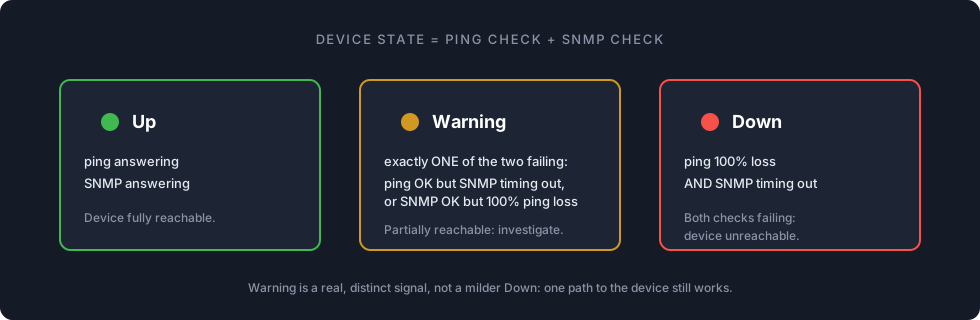
| State | Ping | SNMP | Meaning |
|---|---|---|---|
| Up | answering | answering | Fully reachable and polling normally. |
| Warning | one of the two failing | one of the two failing | Partially reachable: exactly one check is failing. |
| Down | 100% loss | timing out | Unreachable on both paths. |
The important subtlety: Warning is a distinct diagnostic signal, not a milder shade of Down. A Warning device is answering on one path, and which path is still alive tells you where to look.
Reading a Warning
Section titled “Reading a Warning”Ping OK, SNMP failing (the common case):
- The device is powered and the network path works, but the management plane isn’t answering: an SNMP ACL not permitting the agent’s IP (the most common onboarding issue), a wrong community, a v3-only configuration, or an SNMP daemon that stopped responding.
- On Huawei switches under a broadcast/ARP storm, control-plane protection (CPCAR) throttles the switch’s own SNMP responses while forwarding still works, so a whole group of switches going SNMP-dark simultaneously usually indicts the shared L2 segment, not the switches.
- High CPU on the device can starve SNMP too, check the CPU alarms.
SNMP OK, ping failing is rarer and usually means ICMP is being filtered or rate-limited somewhere on the path while UDP still flows.
Reading a Down
Section titled “Reading a Down”Both checks failing means the agent cannot reach the device at all. Before concluding the device itself died, remember a whole-site outage has two classic causes: power and fiber, and both take everything behind them down together. Check whether neighboring devices at the same site dropped at the same minute; a simultaneous cluster points at the uplink, ring or site power rather than at any single box.
The stale-data caveat
Section titled “The stale-data caveat”When a device is Down or SNMP-dark, everything NetSense shows for it beyond the state itself is the last known data from before it went unreachable: port statuses, uptime, temperatures, ONU lists. A port shown “Up” on a Down switch is not live information.
Only trust port states and readings on devices that are currently Up. During an incident, work from the active alarms and the last 24 hours of alarm history: alarm timestamps (when packet loss opened, when SNMP timed out) are the reliable timeline of what happened and when.
Timing expectations
Section titled “Timing expectations”- State follows the polling cycle: after a device dies or recovers, allow a couple of minutes for the state to reflect it, and a moment longer for dashboards to refresh.
- Alarms attached to state (device down, SNMP timeout, packet loss) additionally respect any alarm delay you configured, so a 5-minute delay means 5 quiet minutes by design.
- The availability bar on the device page is the ping history at a glance: solid green with a Warning state means the SNMP leg is the problem, and vice versa.