
VSOL and Syrotech OLTs
VSOL-chipset OLTs are the most common OLT family in NetSense deployments. This page applies to VSOL and Syrotech/GoIP models and to white-labels built on the same platform (Netlink, Optilink Adopt, Sharp Vision and others): the web UI and behaviors are near-identical across them.
Three configuration steps get one of these OLTs fully monitored: SNMP access, syslog, and the alarm profile. Each has a vendor-specific trap worth knowing.
1. SNMP access, and the Login Access List
Section titled “1. SNMP access, and the Login Access List”The SNMP community lives at System Configuration → SNMP, in the SNMPV1/V2 tab
(factory defaults: public read-only, private read-write). Enter the same community in
NetSense when adding the device.
The trap: these OLTs have a separate per-protocol access list at
System Configuration → Login Management → Login Access List, and it is the number
one reason a VSOL/Syrotech OLT won’t poll. A global Deny / IPv4 / SNMP / 0.0.0.0/0 row
there silently drops all polling, regardless of the community being correct.
Fix:
- Add a row: Permit / IPv4 / SNMP / <agent-ip> / 255.255.255.255.
- Delete the global SNMP Deny row(s), or clean the list.
- Keep Login Access Status = Enabled.
(A Permit / IPv4 / SNMP / 0.0.0.0/0 rule also works if you prefer not to scope by IP,
but the agent-only permit is the recommended pattern.)
You don’t need to configure SNMP traps: NetSense uses polling plus syslog. One quirk to know if you use a third-party trap receiver: the trap form pre-fills UDP port 161 rather than the standard 162, so confirm the port on the receiving side.
2. Syslog
Section titled “2. Syslog”Web UI: System Configuration → System Log → Syslog Server tab. Set Syslog Server = Enable, Server IP = your agent’s IP, Server Port = 514, and Submit.
CLI equivalent on Syrotech EPON/GPON:
syslog server ip <agent-ip> port 514(Some models use the syslog add <server-ip> then syslog activate ip <server-ip> form.)
Two notes:
- The “Save Syslog to Flash” tab is local logging to the OLT’s own flash and is not needed for NetSense; leave it alone.
- If syslog doesn’t arrive despite correct settings, check OLT Configuration → Route → Static Route: if the OLT’s default gateway is a transit router, that router needs a return route to the agent’s subnet. The full triage is in Sending device syslog to NetSense.
3. Alarm Profile: make the OLT generate ONU events
Section titled “3. Alarm Profile: make the OLT generate ONU events”Configuring the syslog server is not enough on this platform: the Alarm Profile decides which events the OLT generates at all, and on many units every ONU alarm type ships unchecked, so nothing is ever sent.
Go to Profile Configuration → Alarm Profile → ONU tab and enable: Equipment Alarm, Power Alarm, Battery Missing, Battery Failure, Physical Intrusion, ONU Self Test Failure, IAD Connection Failure, PON If Switch, Sleep Status Update. Leave ONU Temp High, ONU Temp Low and Battery Volt Low disabled, they produce noise in typical ISP environments. Submit, and ONU events (offline/online, dying gasp, port LOS) start flowing to NetSense.
Verify with a test ONU
Section titled “Verify with a test ONU”The clean way to confirm the whole chain is to sacrifice one ONU for two minutes, testing the two failure modes separately:
- Power off the ONU at the adapter. The OLT emits a dying-gasp event and, within moments, NetSense shows the ONU down with reason Power Off. This is the most reliable event on this platform.
- Power it back on, then pull the fiber. Expect a loss-of-signal event and reason Optical Loss.
In the ONU list the device flips to Down with the dying gasp as the reason:

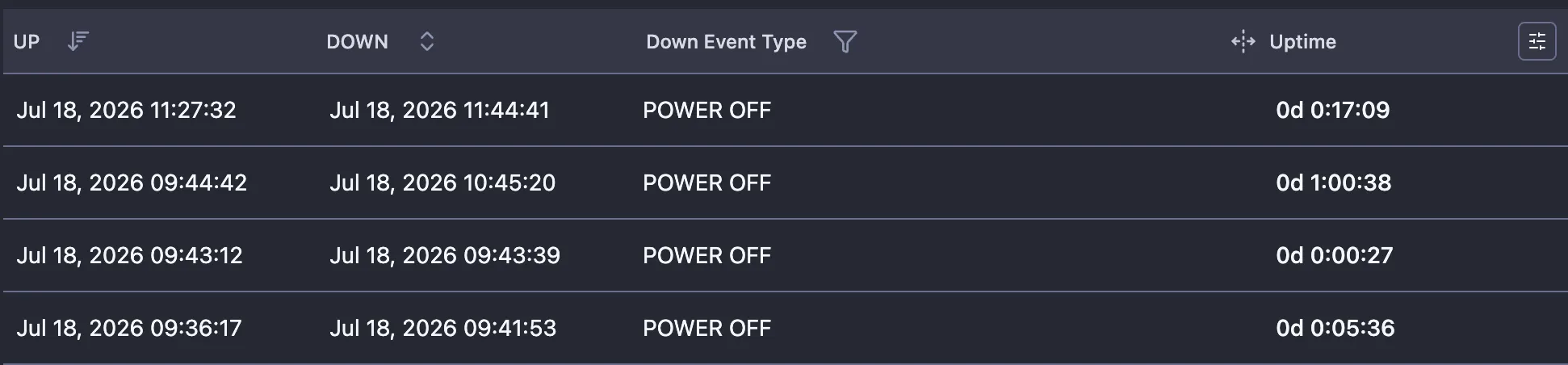
Every transition is kept in the ONU’s up/down history with its Down Event Type, so you can audit past outages per subscriber:
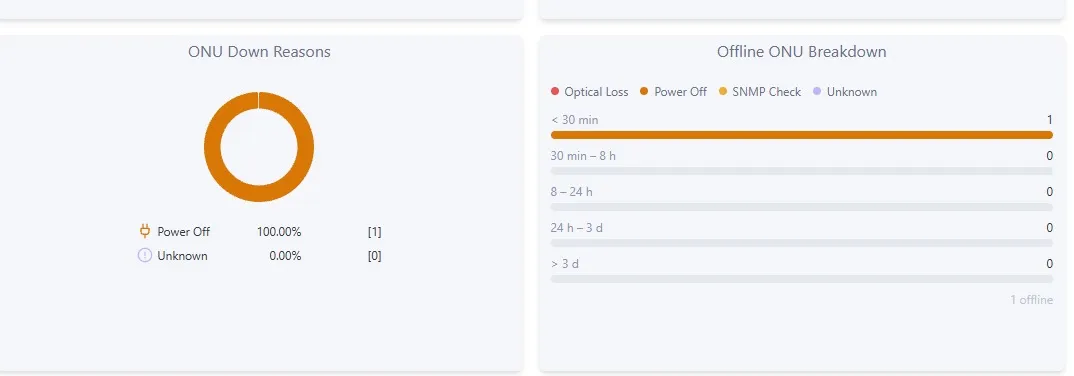
The events also arrive in the device’s Syslog tab as they happen, and the ONU Down Reasons dashboard widget aggregates them:
If the optical test shows “Unknown”
Section titled “If the optical test shows “Unknown””Some Syrotech models do not report every event type properly: power-off (dying gasp) works, but an optical disconnect arrives without a usable reason and NetSense shows the ONU down as Unknown. That is an OLT firmware limitation, the OLT simply does not say why the ONU vanished. The practical reading on such units: if a down ONU is not flagged Power Off, treat it as an optical-path issue (fiber cut, connector, splitter) and dispatch accordingly.
Known quirks on this platform
Section titled “Known quirks on this platform”- Multi-OID SNMP GET firmware bug: on some firmware, bulk GET requests return a value only for the last OID, so most ONUs go missing while other NMS tools look fine. How to confirm it and what to do: OLT shows only a fraction of its ONUs.
- Syslog is the freshness channel. The platform’s SNMP stack is sensitive under heavy load, so NetSense keeps ONU status current primarily via syslog events, one more reason steps 2 and 3 matter.
- Model-specific telemetry gaps exist (for example, some models don’t report Tx power or temperature on PON ports). These are OEM firmware limitations, not polling problems; the templates document what each model can provide, and we raise gaps with the vendor.
- Leave debug modes off. Long-running
debug/gpon-debugsessions on these OLTs can degrade the SNMP process over time.
Useful commands
Section titled “Useful commands”show version # model, HW/SW version, serialshow snmp-server oid-disable # should be empty; entries here block polling of those OIDsshow running config # after: enable, config terWhen reporting an issue to support, the show version output is the single most useful
thing to include, on this platform behavior varies significantly by firmware build.