
Sending device syslog to NetSense
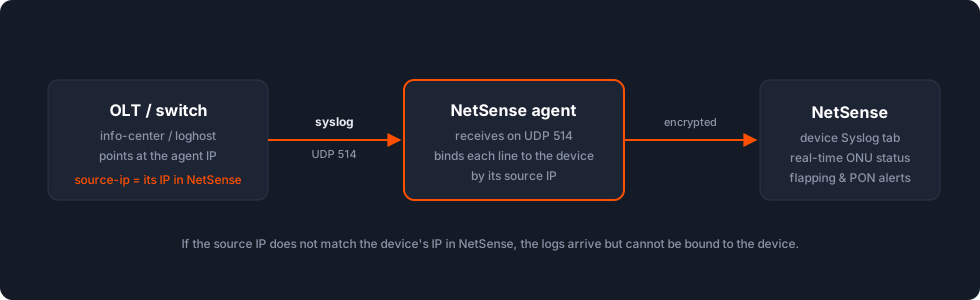
SNMP polling gives NetSense metrics every poll cycle; syslog gives it events the moment they happen. With device syslog flowing, NetSense unlocks real-time ONU status changes, partial PON down detection, and port flapping alerts, and every device gets a searchable Syslog tab.
Setting it up is one config block per device: point the device’s syslog at your NetSense agent’s IP, UDP port 514.
Why it’s worth doing
Section titled “Why it’s worth doing”Without syslog, ONU status refreshes only on the SNMP cycle — every ~30 minutes on current builds, up to 12 hours on old ones — and a down ONU shows no reason. With syslog:
- Live ONU status — an ONU goes down and NetSense reflects it within ~30 seconds.
- Down reason — power-off (dying gasp) vs optical loss vs management loss; this comes only from syslog, never from SNMP.
- Partial PON Port Down — the alarm counts up/down syslog events per interval and fires on a threshold breach; it needs OLT syslog to work at all.
- Port flapping alerts on switches — activate once switch syslog is flowing.
- A single Syslog tab per device, filterable by level (Switch / OLT / ONU).
The one rule that matters: the source IP
Section titled “The one rule that matters: the source IP”NetSense binds an incoming syslog line to a device by the line’s source IP address. If a device sends syslog from a different interface (an OSPF interface, a tunnel/WireGuard address, a NAT’d IP), the logs arrive but cannot be matched to the device, and they are effectively lost.
So on every device: pin the syslog source IP to the same IP the device has in NetSense (usually its management or loopback address). The per-vendor commands below include this.
Huawei switches (S-series, CloudEngine)
Section titled “Huawei switches (S-series, CloudEngine)”system-viewinfo-center enableinfo-center loghost <agent-ip> source-ip <device-ip-in-netsense> facility local4info-center max-logfile-number 10save-
Use
facility local4. (facility localalso works on some builds, but standardise onlocal4.) CloudEngine (CE) models use the identical config. -
max-logfile-numbercaps the on-box log ring (10–30 is typical) so logging can’t fill flash; optional but recommended. -
On NE40E routers, remember to
commit. Apply the same block on OLTs that support theinfo-centerfamily, not only on switches. -
Some builds expose a channel/level form instead — set the destination on the
loghostchannel andcommit:system-viewinfo-center loghost <agent-ip> channel loghost level notificationcommit
Huawei OLTs (MA5600 / MA5680 / MA5800 family)
Section titled “Huawei OLTs (MA5600 / MA5680 / MA5800 family)”These use the loghost add form. Note that on Huawei OLTs, loghost and syslog are
distinct subsystems — you must enable the syslog subsystem first, which unlocks the
info-center / remote-log commands:
configinfo-center enablesyslog enable alarm-eventsyslog output allloghost add <agent-ip> <name>loghost activate ip <agent-ip>The <name> token is a label for the server, typically the agent hostname
(nsa.<customer>.netsense.app). If you’re validating message parsing across models, MA5608T
and MA5800-X2 are the two reference builds we compare against.
Optilink OLTs
Section titled “Optilink OLTs”Optilink OEM OLTs run Huawei-style firmware but use different syslog keywords. Two forms seen in the field:
GPON OP-GOLT-948 — multi-channel info-center block, host with level-list:
info-center monitor 0...info-center monitor 15info-center flashinfo-center snmp-agentinfo-center <agent-ip>info-center host <agent-ip> level-list 0 1 2 3 4 5 6 7 module sysloginfo-center facility systemEPON OP-EOLT-9702 — syslog add / syslog activate form:
syslog add <agent-ip>syslog activate ip <agent-ip>VSOL OLTs
Section titled “VSOL OLTs”Primarily web-UI driven. System Configuration → System Log → Syslog Server tab: set Syslog Server = Enable, Server IP = your agent’s IP, Server Port = 514 (UDP, default), and Submit. Tick the boxes so events are written to the local log and sent to the remote syslog.
CLI form on models that expose it:
syslog server enable <agent-ip>syslog server alarm enableConfiguring the server is not enough on this platform — you must also enable the events in the Alarm Profile (see Enable the events themselves). Full VSOL walkthrough, including the Login Access List that blocks SNMP: VSOL and Syrotech OLTs.
Syrotech OLTs (EPON/GPON)
Section titled “Syrotech OLTs (EPON/GPON)”Web UI is the same System Log → Syslog Server tab as VSOL. CLI form:
syslog server ip <agent-ip> port 514(Some models use the syslog add <agent-ip> then syslog activate ip <agent-ip> form
instead.) Confirm with show running-config | include syslog. Syrotech emits ONU events via
auditd, e.g.:
Syrotech-gpon-olt auditd[0]: ONU Offline PON 0/5 ONU 2 sn TPLGB5A65A58 .Syrotech-gpon-olt auditd[0]: ONU Dying Gasp PON 0/5 ONU 2 sn TPLGB5A65A58 .Syrotech-gpon-olt auditd[0]: ONU Online PON 0/6 ONU 9 sn TPLG4A280238 .Syrotech-gpon-olt auditd[0]: ONU Port Los PON 0/6 ONU 9 sn TPLG4A280238 LAN1 LINK DOWN.These carry offline/online, Dying Gasp and per-LAN-port LOS — exactly what NetSense turns into live status and down-reason. Full Syrotech walkthrough (Alarm Profile, firmware quirks, test-ONU verification): VSOL and Syrotech OLTs.
Genexis Saturn / Mars OLTs
Section titled “Genexis Saturn / Mars OLTs”These have two independent log subsystems, and the one carrying ONU events is off by default — the single most common reason a Genexis fleet shows ONUs down with no reason:
ont-logging timestamps datetimeont-logging <agent-ip> ! forwards ONU/ONT events to NetSenselogging <agent-ip> ! general system loglogging facility systemlogging alone looks like working syslog but never carries ONU events — ont-logging is
what pushes them. Apply it per OLT. Full explanation, the %ONTMNT event format and the
POWER_OFF / LOSI / LOAMI reason table:
Genexis Saturn and Mars OLTs.
Cisco switches
Section titled “Cisco switches”No remote-syslog block differs meaningfully from the standard logging host form, but two
field notes matter:
- Timestamps / NTP. Make sure the device has NTP and
service timestamps log datetimeset so every line carries a stable, correct time — invaluable when correlating an outage across devices. - Cisco (and Rikom) switches are the ones most often found silently not sending while Huawei on the same site works. If a Cisco device’s Syslog tab stays empty, treat it as a delivery problem and walk the troubleshooting list — don’t assume the config “took”.
MikroTik
Section titled “MikroTik”A vetted MikroTik syslog recipe isn’t captured here yet — if you’re configuring one, confirm
the working /system logging action + remote setup with support so we can add it.
OLTs with alarm profiles: enable the events themselves
Section titled “OLTs with alarm profiles: enable the events themselves”On some OLT platforms (VSOL, Syrotech and similar web-UI OLTs), configuring the syslog server is not enough: the OLT also has an Alarm Profile deciding which events it generates at all. If every ONU alarm type is unchecked there, the transport is perfect and still nothing arrives, because the OLT never produces the events.
Go to Profile Configuration → Alarm Profile → ONU tab and enable the alarm types. We recommend enabling everything except ONU Temp High, ONU Temp Low and Battery Volt Low, which mostly produce noise in normal climates. Submit, and ONU events start flowing.
Already running a syslog server? Relay to NetSense
Section titled “Already running a syslog server? Relay to NetSense”If a customer already centralises syslog (Observium, Graylog, a bare rsyslog/syslog-ng box), you don’t have to re-point every device. Point the devices at the existing collector as usual and relay a copy to the NetSense agent — this also gives you redundancy: two independent collectors receive every line.
On an rsyslog collector, add a forward line to /etc/rsyslog.conf (or a file in
/etc/rsyslog.d/) and restart rsyslog:
*.* @@<agent-ip>:514@@= TCP, single@= UDP. Use whichever the agent’s listener is configured for (ask support; UDP 514 is the default, TCP is set up on request).- If the collector can’t reach the agent’s private IP directly, relay to a public IP with
a port redirect — e.g. publish
11514on the public edge and DNAT11514 → 514to the agent’s private IP.
If syslog doesn’t arrive
Section titled “If syslog doesn’t arrive”Working SNMP and ping do not prove syslog can flow (different port, different direction). The usual suspects, in order:
- A transit router filters UDP 514. SNMP is often explicitly permitted while syslog has no rule. Permit UDP 514 from the device to the agent on every router in the path.
- No return route to the agent. If the device’s default gateway is a transit router and the agent sits on a NAT’d private IP, the router may have no route back. Agent-initiated SNMP works (outbound) while device-initiated syslog dies. From the device, ping and traceroute the agent IP; if both die at the first hop, it’s L3 routing, not NetSense. Note that OLT→agent syslog can’t be fixed with a port redirect — it needs proper routing.
- Wrong source IP (see the rule): logs reach
the agent but never bind to the device. Pin the
source-ip. A common variant: the device sends from its WireGuard/public IP instead of its own — bind the source explicitly. - Events not enabled on alarm-profile OLTs, or ONU/ONT logs not enabled separately
(Genexis
ont-logging; VSOL/Syrotech Alarm Profile). The system log flows but ONU events don’t.
To locate where packets are lost, capture on the agent and on intermediate hops:
tcpdump -i any -n udp port 514 # on the agent VM — do lines arrive at all?tail -f /var/log/messages # confirm content once packets landIf syslog packets appear on a transit router’s device-facing port but not at the agent, the block is on the far side; if they never appear at all, the device isn’t sending. Support can run the agent-side capture for you on request.
Verify
Section titled “Verify”Open the device in NetSense and check its Syslog tab: new events should appear shortly after the configuration. Force one — reboot a test ONU (expect an offline / Power Off event) or flap an unused port. Once several devices are sending, the syslog-driven alerts (real-time ONU status, Partial PON down, Port flapping) activate automatically.
Related
Section titled “Related”- VSOL and Syrotech OLTs — Login Access List, Alarm Profile, firmware quirks.
- Genexis Saturn and Mars OLTs — the
loggingvsont-loggingsplit in full.