
Your Monitoring Shouldn't Choke When the Long-Haul Link Does
It is 20:30 on a Friday. The long-distance link to your network in the next town is running at 85%, which is normal for the evening peak. Then forty devices on the far side of it turn Warning in the NOC. OLT graphs start showing holes. A port alarm closes and opens again, twice. Someone asks whether to send a team.
Nothing is wrong with those forty devices. The fiber is fine, the OLTs are fine, subscribers are streaming. What is choking is your monitoring, because every SNMP request and every ping to those devices has to cross the same busy link the subscribers are using.
Until October, a NetSense tenant had one polling agent, and for most networks that is still the right answer. But one agent has two weak spots: when its server dies, monitoring stops for the whole network, and when part of the network sits behind a long, thin link, the agent can only see it through that link. So since version 1.75.0 a tenant can run as many agents as its network needs.
What shipped
The short version: you run more than one agent, and you decide which agent polls which device.
- One agent is the tenant default: every device without its own assignment is polled by it, so adding a second agent changes nothing until you assign devices to it.
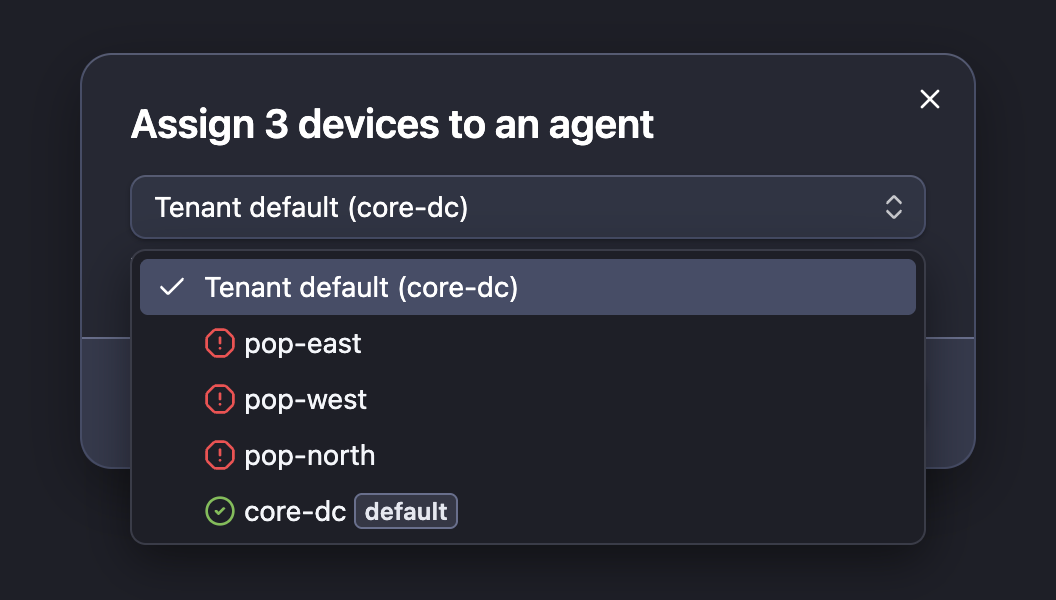
- Per-device assignment: a device assigned to an agent is polled by that agent. Assign one device from its edit page, or select a whole list in Inventory and click Assign agent (added in 1.76.0).
- Automatic failover: if a device's agent goes offline, the default agent takes over, then any other online agent. When the agent comes back, its devices move back to it. Nobody touches anything in either direction.
- The Agents page: under Admin → Agents, every agent with its status, IP, platform, version, last seen, and its CPU, memory and disk usage over time. Each agent has its own page with the devices it polls, searchable and filterable by site, zone and partner since 1.77.0.
- Permissions: two new role permissions, Agent View and Agent Edit, decide who can see the agents and who can move devices between them.
A change of agent takes effect within about 30 seconds.
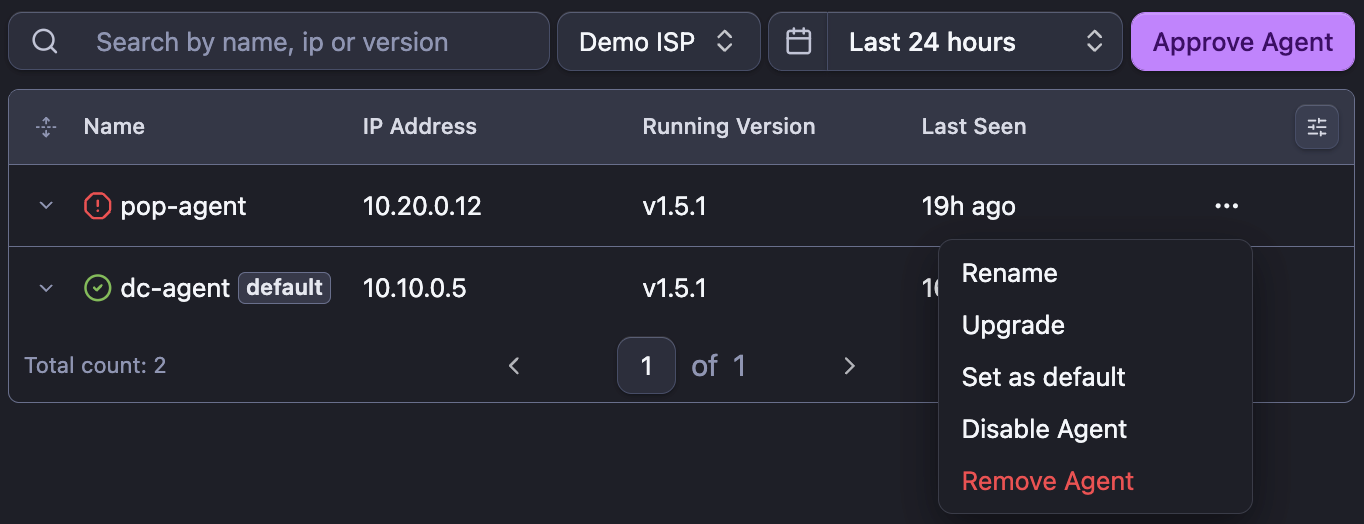
That is the mechanism. Here are the two reasons to use it.
Use case 1: monitoring that survives losing its own server
With one agent, the agent's server is a single point of failure for your entire monitoring. A hypervisor reboot, a dead disk, a power problem in the rack, and the whole NOC goes blind at once. Usually at the moment you need it most, because whatever took the server down may be taking other things down with it.
A second agent removes that. The usual setup is a main and a backup:
- Main agent: the tenant default. Leave your devices on Tenant default and it polls all of them.
- Backup agent: no devices assigned. It sits there, connected, and takes over every device the moment the main agent goes offline. When the main agent is back, it hands them back.
There is nothing to switch on. It is the same failover described above. And only one agent polls a device at a time, so the backup adds no SNMP load to your OLTs and switches.
You can also split the devices between the two agents, so each one does real work every day and covers for the other.
Three things make the pair actually work:
- A separate server. A second VM on the same host goes down with the host. That is not redundancy, it is two copies of the same failure.
- The same reach from both agents. The backup needs a route to every device and its own IP in every device's SNMP access list. A device that only permits the main agent's IP is the classic gap: failover happens, and that one device goes silent.
- A test before you need it. Assign your devices to the backup for a few minutes. Anything that turns Warning is a device the backup cannot reach. Fix it, then put the devices back on Tenant default.
Use case 2: remote areas behind a long-distance link
Almost every ISP we work with has at least one area that hangs off the main network by a single long-distance link: an NLD (national long distance) circuit, a leased point-to-point wave, a microwave hop to a town that fiber has not reached yet. The subscribers out there are fine most of the time. Monitoring them from a central agent is not.
The reason is how SNMP works. Polling an OLT is not one request, it is a long conversation. Walking the ONU table, the PON ports and their optical readings is thousands of small request and response pairs, mostly one after another. On a local network each round trip takes a millisecond or two and nobody notices. Across a link with 40 to 60 ms of latency, the same poll takes many times longer. Add 1 or 2% packet loss and some of those requests time out entirely.
What you see in the NOC:
- Partial polls: some requests in a poll time out. NetSense marks those polls Partial, in amber, on the device's Poller tab.
- Gaps in the graphs: values that did not arrive in time are simply missing.
- Wrong alerts: every device behind the link inherits the link's packet loss on its one-second ping, and devices start flapping between Up and Warning for no reason of their own.
- Large OLTs that never finish: even with no congestion at all, latency alone can push the walk of a big OLT past its polling cycle, so the OLT is never fully polled.
And the worst part is the timing. The link chokes at peak hours or when something upstream fails, which is exactly when the NOC most needs to trust what it sees.
The fix: poll from the far end
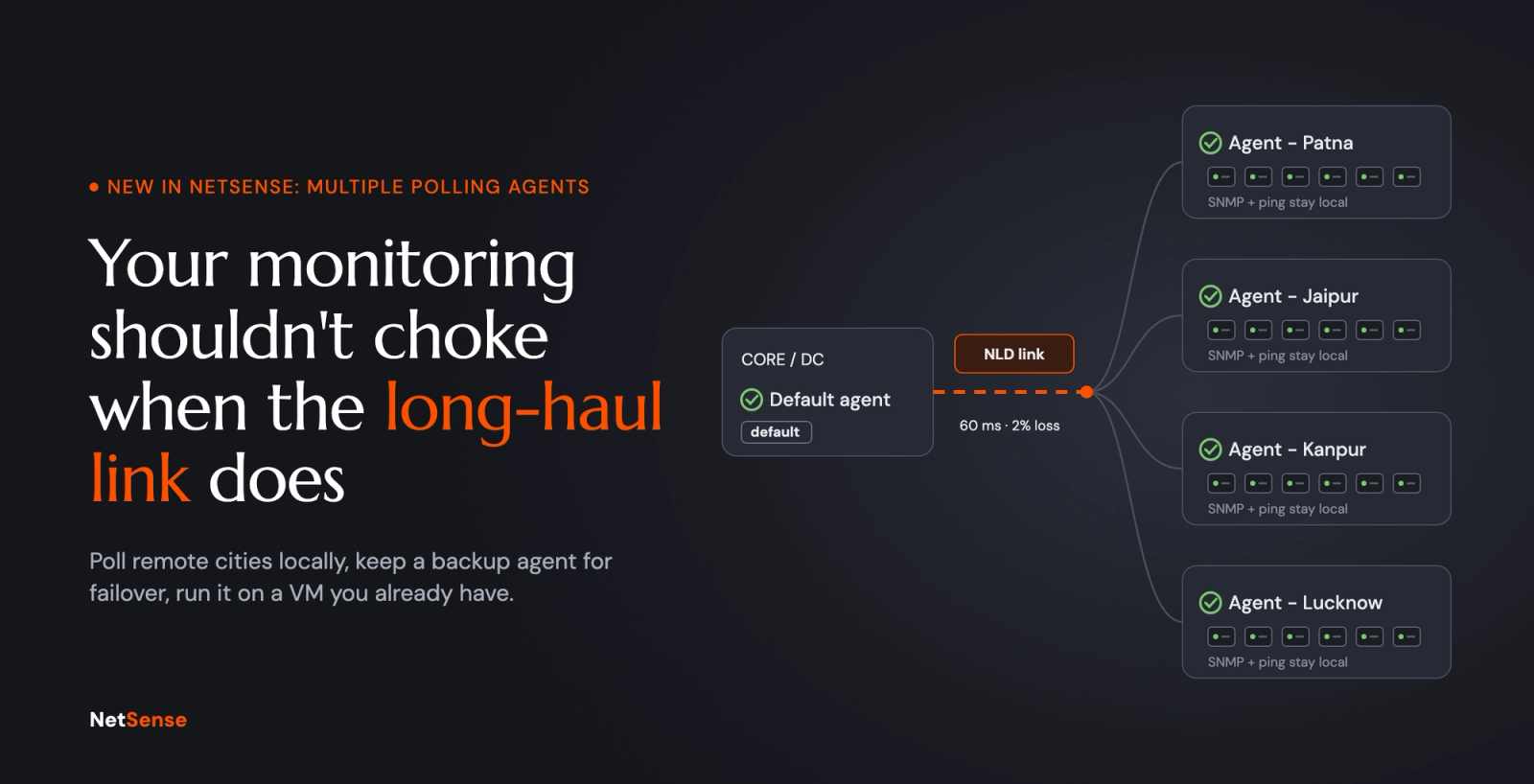
Put an agent on the far side of the link. SNMP and ping then run across the local network at the remote site, at local latency, and only the results travel back to NetSense. Thousands of chatty round trips per poll become one connection carrying the finished data, and that connection does not care much about 60 ms.
In NetSense this is three steps: install the agent at the remote site, tag the devices out there (a Site or Zone works well), then filter Inventory by that site, select everything and Assign agent. Point the remote devices' syslog at the local agent too, so their events stay local as well.
Two details make this setup better than it sounds at first:
- Keep watching the link itself. With an agent at the far end, the remote devices stop reporting the link's latency and loss, which is the point. But you still want to know when the link is in trouble. Leave the router at the far end of the link on your central agent, assigned to it by name. Its latency, loss and jitter then measure the link and nothing else, so you see the link's problem as the link's problem, not as forty separate device alarms. If your routers already run Cisco IP SLA, Huawei NQA or Juniper RPM probes across the link, NetSense collects those too.
- The two use cases combine. If the remote agent goes down, failover still applies: the central default agent takes over the remote devices across the long-distance link. Polling is slower and noisier for a while, but you are not blind. That only works if the central agent still has a route and an SNMP ACL entry for those devices, so leave them in place.
How small is small
Everything heavy in NetSense (the application, the database, the dashboards) runs on our side. The agent is the only thing you host, and it is deliberately small: a collector that polls, pings, receives syslog and ships results.
The documented minimum is 2 CPU cores, 4 GB of RAM and 20 GB of disk, on a plain AlmaLinux 9 or Ubuntu Server install. That fits in places you already have:
- a small VM on the hypervisor you already run (ESXi, Proxmox, Hyper-V, KVM)
- an old 1U server or a mini PC in the remote POP's rack
- a 64-bit ARM board such as a Raspberry Pi 4 or 5 with 4 GB or more, since the agent is built for arm64 as well as x86
The site needs one IP the NetSense backend can reach (public, or a port forward) and a route to the devices' management network. That is the whole list. You install the OS and give us SSH access; our team installs, configures and maintains the agent, usually within one working day. Upgrades are pushed from the Agents page, and you can watch every agent's CPU, memory and disk from there.
That is why one agent per remote area is a reasonable thing to do, not a project. A Raspberry Pi in the remote POP costs less than one truck roll caused by a false alarm.
What it does not do (yet)
Being honest about the edges:
- Syslog does not fail over. A device sends syslog to the agent IP in its own configuration. While that agent is down, its devices are still polled by another agent, but their syslog waits until it is back.
- Failover follows the agent, not each device. If an agent is up but has lost its route to part of the network, those devices go Warning and stay with it. Failover is for a dead agent, not a broken route.
- A VM snapshot is not a backup agent. Agents are updated often, so a copy is out of date by the time you need it. Run two agents all the time.
- New agents are installed by our team, the same way as the first one. With Agent Edit you can approve a new agent yourself with the one-time code we send you.
The number of agents depends on the plan: 3 on Growth, 10 on Pro, unlimited on Enterprise. The full guide, including the redundancy checklist, is in the docs: Running several polling agents.
Excitel: an agent in every remote city, on VMs that were already there
Excitel Broadband connects more than a million homes across 50+ Indian cities, and many of those cities reach the core over NLD links. That is use case 2, multiplied by every city on the map.
They did not buy a single server for it. Every remote city already had local VMs for the services that belong next to subscribers: local DNS, the speed test server and the like. Those hosts had spare capacity, so Patna, Jaipur, Kanpur and Lucknow each got a NetSense agent as one more small VM beside them. Excitel started right after the feature shipped. Their part was creating a VM per city; ours was installing the agent and moving that city's devices onto it, which is a site filter and one Assign agent. No hardware order, no change window, no new rack space.
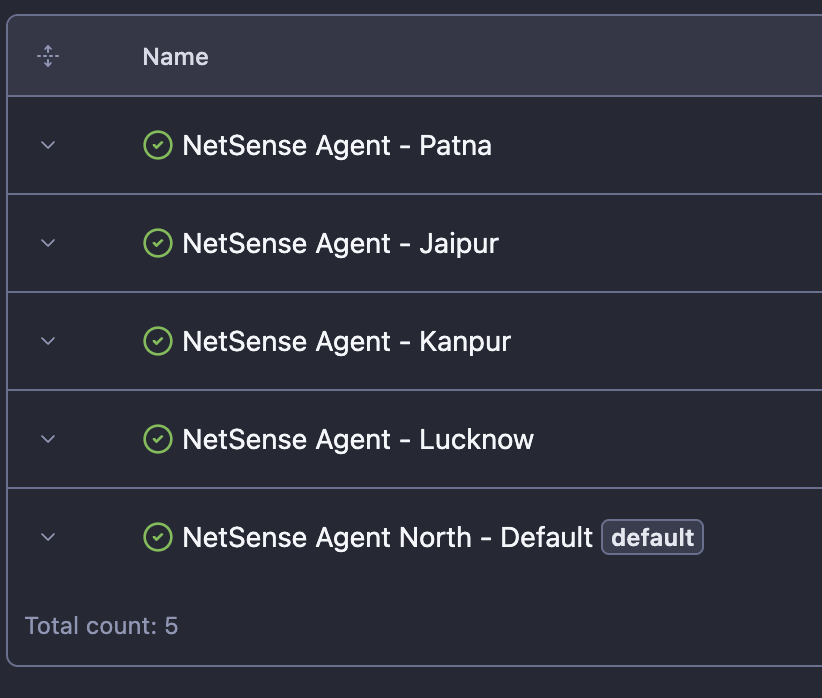
That is Excitel's production Agents page. The North agent stays the tenant default: it polls everything that is not assigned to a city, and it is the fallback for any city whose agent goes offline.
That is now the first thing we ask any ISP with remote cities: what do you already run out there? If a city has a DNS resolver, a speed test server or a cache, it has a hypervisor or a server with room for a 2-core, 4 GB VM, and the agent fits next to it.
How this got built
Multi-agent support did not come from a roadmap slide. It came from operators asking the same two questions in different words: "what happens to monitoring if this server dies?" and "why do my devices in that one town always look sick?" The first version shipped in October, bulk assignment followed nine days later, and the agent page filters less than two weeks after that, each one because somebody moving real devices between real agents told us what was slow. If something in your setup still does not fit, tell us. The fastest path from a workaround to a feature has always been a customer email.
Try it
NetSense is free forever up to 1,000 nodes. No card, no time limit, and enough to see what your network looks like through a NetSense agent. If you already have a town behind a long-distance link that never looks right in your current NMS, book a live demo and we will show you what changes when the poller sits next to the devices.
Already a NetSense customer? Open Admin → Agents. If you only see one agent there, ask us for a second one.
Frequently Asked Questions
- Why does SNMP polling fail over high-latency or lossy links?
- Polling a device over SNMP is thousands of small request and response pairs, most of them sent one after another, so every request pays the link's round-trip time. At 40 to 60 ms of latency a poll takes many times longer than on a local network, and with even 1 to 2% packet loss some requests time out. The result is partial polls, gaps in graphs and false alarms, which get worse exactly when the link is congested.
- How do I monitor remote sites connected over a long-distance or point-to-point link?
- Run a polling agent at the remote site, so SNMP, ping and syslog stay on the local network and only the collected results travel over the long-distance link. Keep the router at the far end of the link monitored from your central poller, so the link's own latency and packet loss are still measured. In NetSense you install a second agent at the site and assign the remote devices to it in bulk from Inventory.
- How do I make network monitoring redundant if the polling server fails?
- Run a second polling agent on a separate server that can reach the same devices, with its IP added to every device's SNMP access list. In NetSense the backup agent needs no devices assigned: if the main agent goes offline, the backup takes over all of its devices automatically and hands them back when the main agent returns. Only one agent polls a device at a time, so the backup adds no SNMP load.
- What hardware does a NetSense polling agent need? Can it run on a Raspberry Pi?
- The documented minimum is 2 CPU cores, 4 GB of RAM and 20 GB of disk on a plain AlmaLinux 9 or Ubuntu Server install, either a VM or a small physical server. The agent is built for 64-bit ARM as well as x86, so a Raspberry Pi 4 or 5 with at least 4 GB of RAM is an option for a small remote site. The NetSense team installs and maintains the agent; the customer only provides the machine and SSH access.
- Does running two polling agents double the SNMP load on my devices?
- Not in NetSense. Each device is polled by exactly one agent at a time, either its assigned agent or, when that agent is offline, the failover agent. A backup agent with no devices assigned sends no SNMP requests until it takes over.